

2.21.26 – APFA MIA Base Brief – Update: Cuba Cancellations

Saturday, February 21, 2026
Update: Cuba Cancellations
Last night the company announced the cancellation of some flights in and out of Cuba. The cancellations include the following:
- One daily round trip between MIA and HAV starting February 19th through March 28th. The impacted round trips include flight #2699/2696.
- One round trip between MIA and SCU on March 14th, 21st, 28th, and 30th. The impacted round trips include flight #1519/1532.
- One round trip between MIA and VRA on March 11th, 14th, 18th, 21st, 25th, 28th. The impacted round trips include flight #1807/2450.
Most of the impacted sequences are two leg turns that are full sequence cancellations. A few of the cancellations impact 2- and 3-day sequences. The company has processed the removal of the applicable full sequence cancellations. The cancellations impacting multi-day trips will be processed in the coming days.
What pay protections will apply?
There are multiple provisions in the CBA that may provide pay protections when a Flight Attendant is impacted by cancellations. Below we will provide information on the following provisions that ensure pay protections:
- CBA 10.L – Last Sequence of the Month Pay and Credit
- CBA 10.J.1.b – Sequence Loss Due to Extraordinary Circumstances
CBA 10.L – Last Sequence of the Month Pay and Credit
For cancellations that impact a sequence in your last series of sequences in the bid month, you are pay protected to the full value of the sequence as it was awarded to you. This applies to both full and partial sequence cancellations.
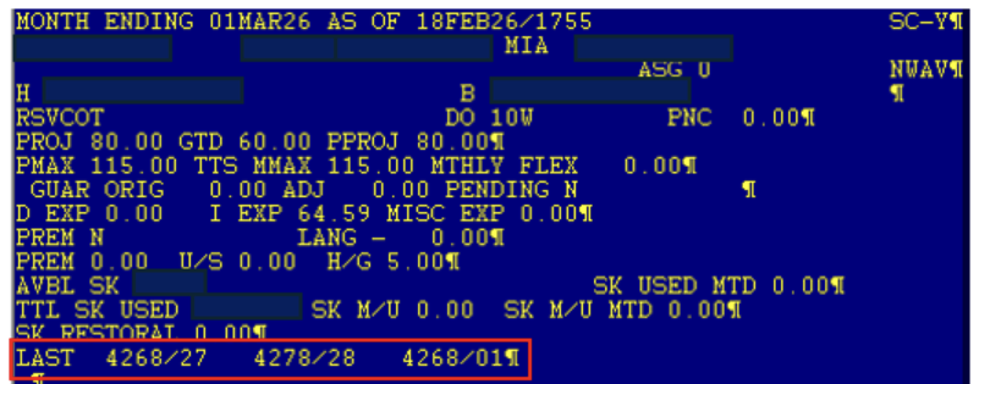
Sequences which are included in your last series are listed under the header of your HI1/HI2. They will display to the right of the word “LAST”, as shown in the below screenshot below (click all images to enlarge).
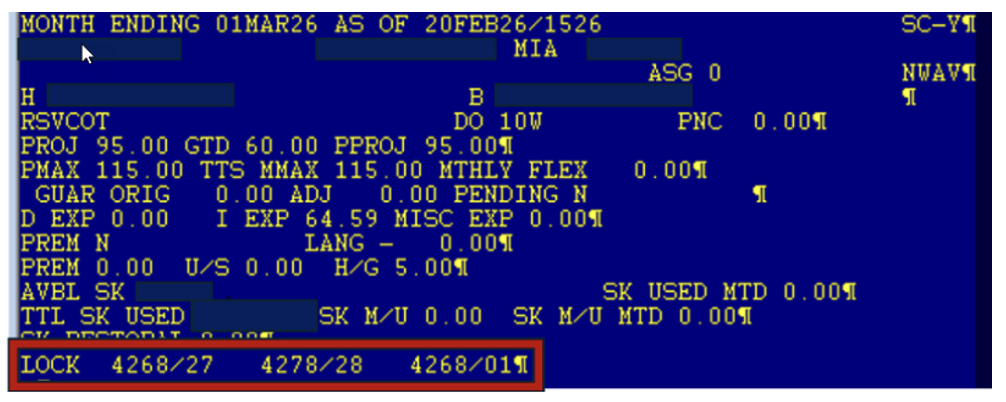
Once there is a qualifying cancellation or removal within your last series, the word “LAST” will change to “LOCK”. This indicates that your last series is now locked to include only the listed sequences, as shown in the screenshot below.
CBA 10.J.1.b – Sequence Loss Due to Extraordinary Circumstances
If you lose three or more full sequences that are not pay protected by other provisions in Section 10 (e.g.. last series), you are pay protected if you make a “reasonable effort” to make up the time as provided for in 10.J.1.b. More information on “reasonable effort” is provided below.
For example, if you lose five sequences and two of them are pay protected by the last series provision, you would be eligible for pay protection for the other three based on 10.J.1.b.
In contrast, if you lose five sequences and three of them are pay protected by the last series provision, you would not be eligible for pay protection for the other two as they do not meet the “three or more” criteria in 10.J.1.b.
For the HAV full sequence cancellations listed above, there are no like sequences. As a result, if you lose three or more HAV sequences within the bid month that are not covered by the last series provision, you will be automatically pay protected for those cancellations with no obligation to make a reasonable effort. The company has stated the qualifying removals have been processed with a paid XP code.
For the SCU and VRA full sequence cancellations listed above, there are like sequences. As a result, if you lose three or more sequences within the bid month that include SCU and/or VRA, which are not covered by other pay protections, you will need to fulfill the “reasonable effort” requirement as outlined in 10.J.1.b.
If within the March bid month, you lose three or more eligible turns, and the cancellations involve a combination of HAV AND SCU and/or VRA turn(s), the HAV turns will automatically be pay protected. You will only be required to make a “reasonable effort” (as described above) for the SCU and/or VRA turns.
To fulfill the “reasonable effort”, a Lineholder will be required to satisfy all of steps 1 and 2 below:
1. Bid for “like sequences” in TTS for the applicable bid month following notification of the full sequence cancellation. TTS requests do not have to be for the original days of canceled sequence(s) and do not have to be consecutive.
A like sequence (comparable to the cancelled sequence) shall have:
- Comparable check-in times (at least one (1) hour before and one (1) hour after original report time) AND comparable check-out times (at least one (1) hour before and one (1) after the original release time).
- Same number of day(s). For the SCU and VRA turns, you only need to bid for “like” NIPD one day turns.
- Domestic for Domestic or IPD for IPD or NIPD for NIPD. For the SCU and VRA turns, you only need to bid for “like” NIPD turns.
- You must bid all positions.
2. Make yourself available in TTS for the equivalent number of TTS runs equal to the number of duty periods in the cancelled sequence(s). (I.E. 1 duty period = 1 TTS run)
- A Lineholder may ballot for multiple sequences in the same 1 (one) TTS run. In the case of the full sequence SCU and VRA turn cancellations, you will need to ballot for like sequences in only ONE TTS run.
TTS Ballot Examples for SCU and VRA Turns
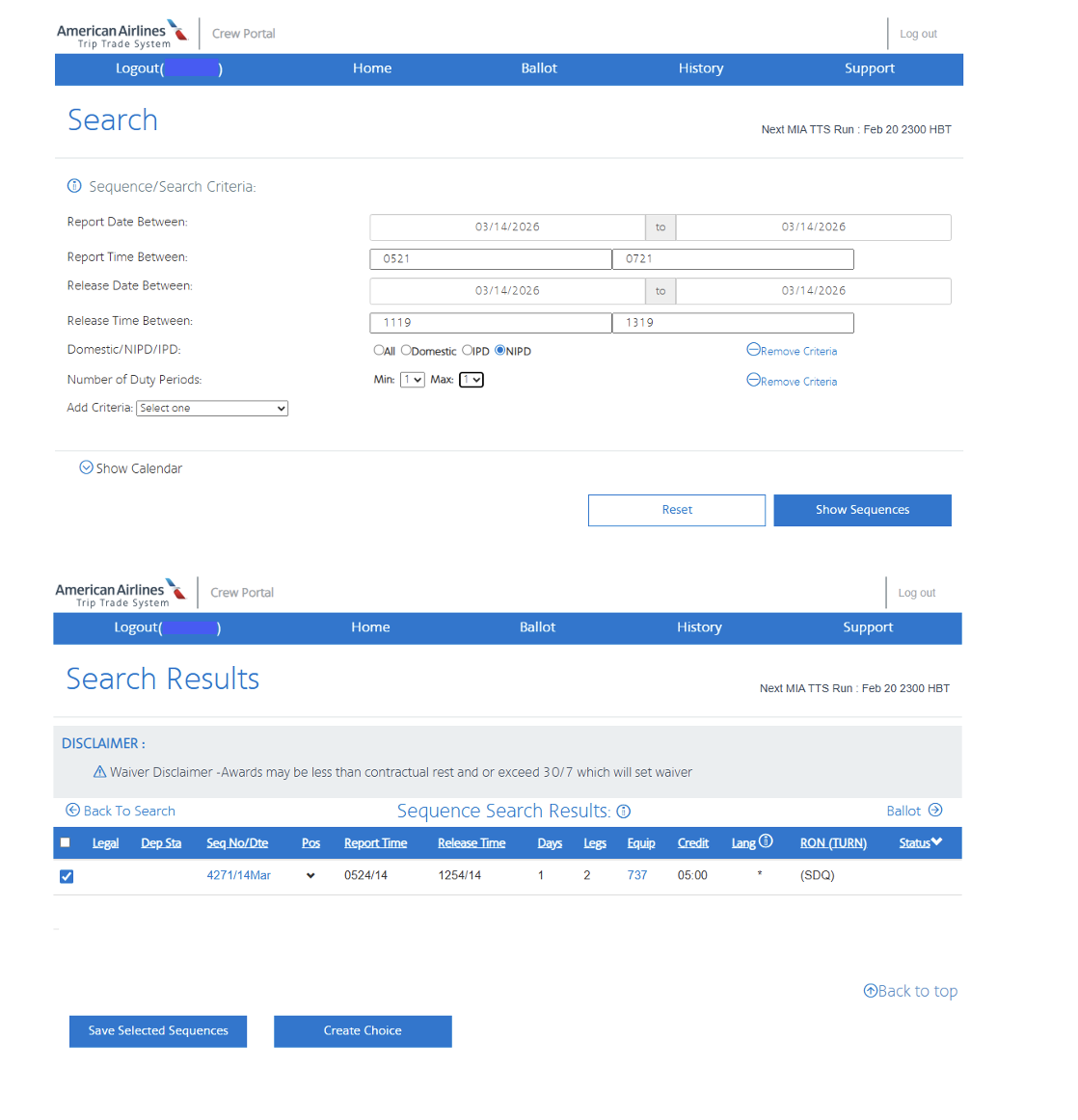
The SCU turns report at 0621 and release at 1219. Based on the criteria listed above, comparable check in/check out times include NIPD turns with a report time between 0521 and 0721 AND a release time between 1119 and 1319.
Below is a sample TTS Ballot which includes the comparable report and release times for the SCU turns. Once you enter the criteria for the like sequences, you will then click on “Show Sequences”.
On the next screen you would click and ballot for all the sequences (including all positions) that populate for the date you are balloting for. In the example below, the only trip that populates is SDQ. Balloting for all positions on the SDQ trip would satisfy the like sequence criteria for the 14th.
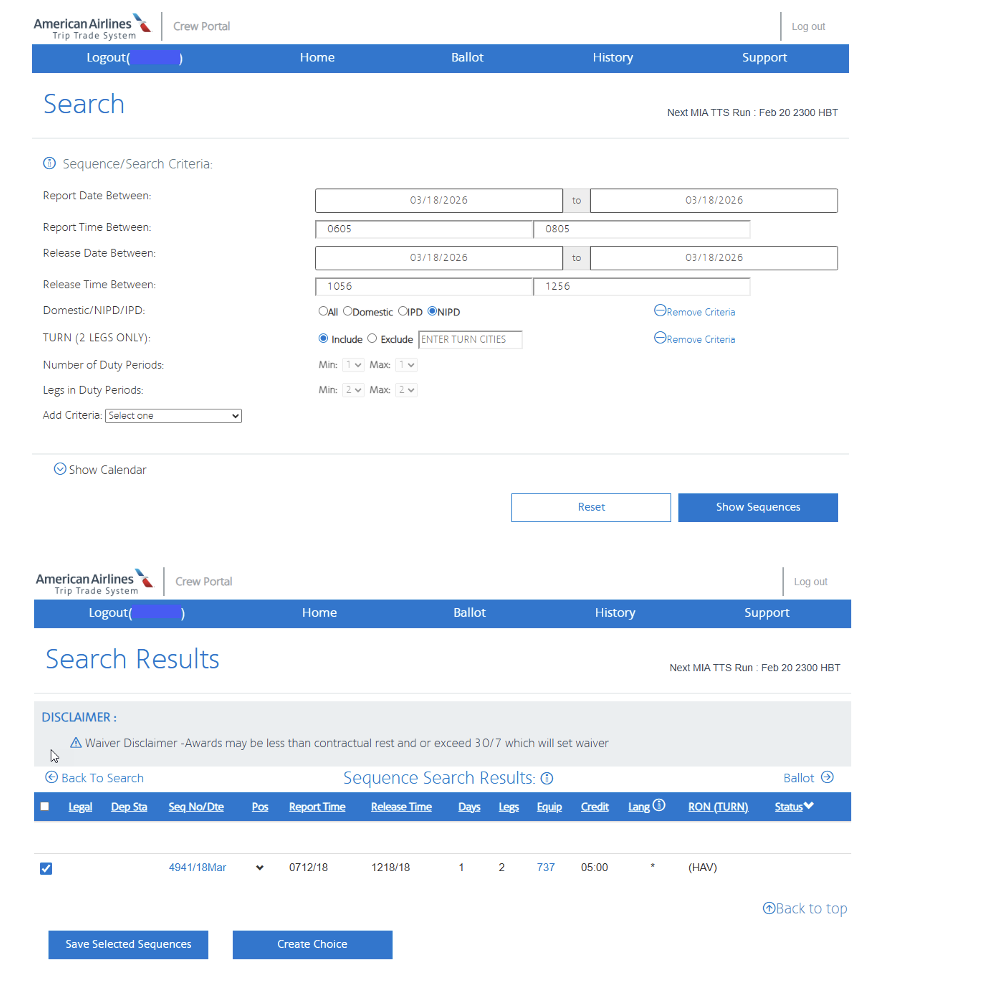
The VRA turns report at 0705 and release at 1156. Based on the criteria listed above, comparable check in/check out times include NIPD turns with a report time between 0605 and 0805 AND a release time between 1056 and 1256.
Below is a sample TTS Ballot which includes the comparable report and release times for the VRA turns. Once you enter the criteria for the like sequences, you will then click on “Show Sequences”.
On the next screen you would click and ballot for all the sequences (including all positions) that populate for the date you are balloting for. In the example below, the only trip that populates is HAV. Balloting for all positions on the HAV trip would satisfy the like sequence criteria for the 18th.
Once you have participated in the required TTS Run, follow these steps for filing a Direct Connect:
- If you are awarded a sequence in TTS and the value is the same or more, including premiums, than the lost sequence, no further action is required, and no additional pay protection is due.
- If you are awarded a sequence in TTS and the value is less than your lost sequence, and you fly the awarded sequence, you must submit a Direct Connect within five calendar days of the TTS award. You should include the TTS run date, Run ID, the awarded sequence details, and date of the canceled sequence. Crew Compensation will then pay the difference by adding a line item of pay in the body of your HI1/HI2.
- If you are awarded (and fly) a sequence in TTS without the same premiums as the lost sequence(s), you must submit a Direct Connect within five calendar days of the TTS award. You should include the TTS run date, Run ID, the awarded sequence details and date of the canceled sequence. Crew Compensation will then pay the premiums by adding a line item of pay in the body of your HI1/HI2.
- If you are not awarded a like sequence in TTS, you must submit a Direct Connect within five calendar days of the TTS ballot and include:
- The TTS run date; and
- The run number; and
- The date of the canceled sequence being protected.
- Once the claim is processed, Crew Compensation will add the protection as a line item in the body of your HI1/HI2.
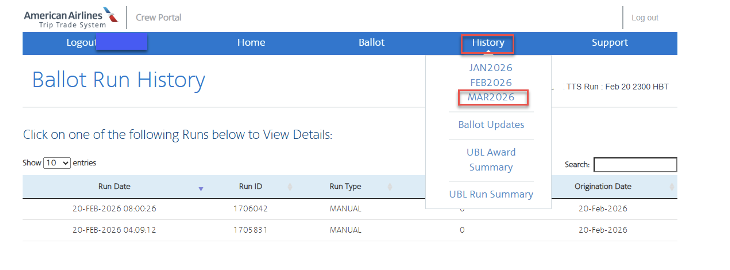
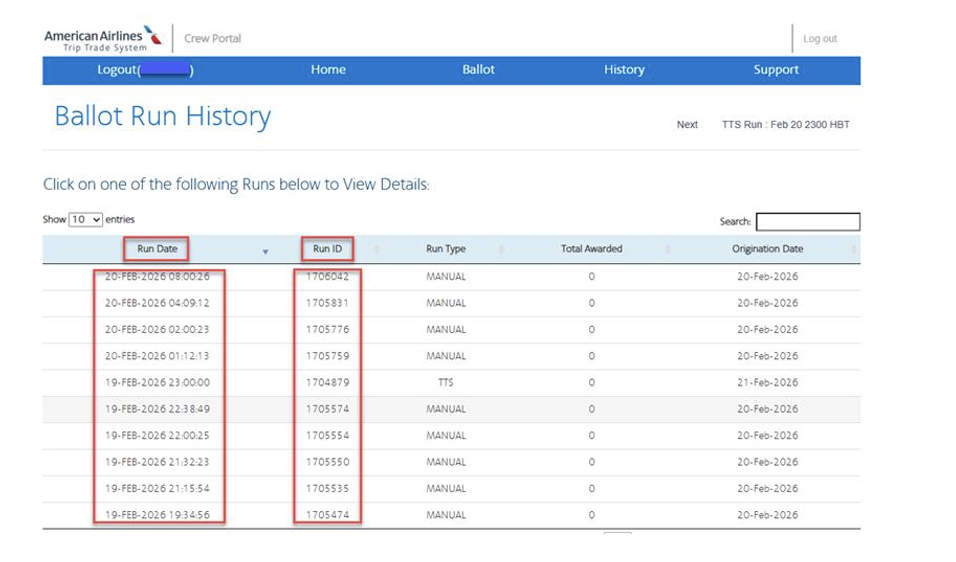
To retrieve the TTS run number and date, go to Crew Portal and click on TTS in the navigational bar, then select the bid month in question (e.g. March 2026). All the TTS runs for the applicable month will be listed (see example below). You can click on the Run ID to view the TTS award results.
If, for example, you balloted for like sequence(s) in the TTS run on February 19th, you would include the Run Date (February 19th) as well as Run ID 1704879 in your Direct Connect ticket.
As a reminder, the path to Direct Connect is on Crew Portal > Links > Compensation > Direct Connect > Click the “+” > Extraordinary Circumstances.
The company is requiring Flight Attendants to submit a separate Direct Connect ticket for each cancelled sequence where pay protection is due.
Double Dipping: If you choose to double dip over the footprint of a pay protected lost sequence, you should only use TTS/UBL. You may use ETB to pick up a sequence outside of the footprint of a pay protected sequence. Processing ETB transactions involving trips that touch the footprint of a pay protected sequence will negate the pay protections for that sequence.
Need help with filing a Direct Connect?
As your employer, the company is responsible for providing support and guidance. Reach out to your Senior Crew/Base Manager if you need assistance with filing a Direct Connect.
Did your claim result in a Direct Denial?
If you receive a Direct Denial for any of these claims, submit a Pay Discrepancy Form on the APFA website.
Please wait until you receive a denial response before reaching out to APFA for assistance. APFA does not have access to your Direct Connect tickets. When submitting a Pay Discrepancy Form, please include screenshots of your Direct Connect submission and any company responses.
In Solidarity,
Jeff Petersen
APFA National Contract Chair
[email protected]
Marti McMillan
APFA National Scheduling Chair
[email protected]

APFA Headquarters
1004 West Euless Boulevard
Euless, Texas 76040
M-F: 9:00AM - 5:00PM (CT)
Phone: (817) 540-0108
Contract & Scheduling Desk
M-Th: 9:00AM - 5:00PM (CT)
Phone: (817) 540-0108
Live Chat Messaging
Fridays: 9:00AM - 5:00PM (CT)
Currently, no scheduled events...
APFA Headquarters
1004 West Euless Boulevard
Euless, Texas 76040
M-F: 9:00AM - 5:00PM (CT)
Phone: (817) 540-0108
Contract & Scheduling Desk
M-Th: 9:00AM - 5:00PM (CT)
Phone: (817) 540-0108
Live Chat Messaging
Fridays: 9:00AM - 5:00PM (CT)
Currently, no scheduled events...
APFA Headquarters
1004 West Euless Boulevard
Euless, Texas 76040
M-F: 9:00AM - 5:00PM (CT)
Phone: (817) 540-0108
Contract & Scheduling Desk
M-Th: 9:00AM - 5:00PM (CT)
Phone: (817) 540-0108
Live Chat Messaging
Fridays: 9:00AM - 5:00PM (CT)
Currently, no scheduled events...