

Pay Information
Pay Scale
| Yrs of Service | Oct 1, 2024 | Oct 1, 2025 | Oct 1, 2026 | Oct 1, 2027 | Oct 1, 2028 |
|---|---|---|---|---|---|
| 1 | $35.82 | $36.81 | $37.91 | $39.05 | $40.42 |
| 2 | $37.97 | $39.01 | $40.18 | $41.39 | $42.84 |
| 3 | $40.40 | $41.51 | $42.76 | $44.04 | $45.58 |
| 4 | $43.03 | $44.21 | $45.54 | $46.91 | $48.55 |
| 5 | $47.39 | $48.69 | $50.15 | $51.65 | $53.46 |
| 6 | $53.67 | $55.15 | $56.80 | $58.50 | $60.55 |
| 7 | $59.21 | $60.84 | $62.67 | $64.55 | $66.81 |
| 8 | $61.11 | $62.79 | $64.67 | $66.61 | $68.94 |
| 9 | $62.80 | $64.53 | $66.47 | $68.46 | $70.86 |
| 10 | $65.15 | $66.94 | $68.95 | $71.02 | $73.51 |
| 11 | $66.94 | $68.78 | $70.84 | $72.97 | $75.52 |
| 12 | $70.12 | $72.05 | $74.21 | $76.44 | $79.12 |
| 13+ | $82.24 | $84.50 | $87.04 | $89.65 | $92.79 |

NOTES:
Rates shown are per Hour.
All Purser positions require a Purser qualification
* 3-Class lead pay for Transcon only
**One (1) Galley position per class of service, i.e, three (3) class service - three (3) Galley positions & two (2) class service - two (2) Galley positions
International Premium Pay
A Flight Attendant on an International Premium Destination (IPD) sequence will receive International Pay for all operating or deadheading segments scheduled in such sequence. They will be paid three dollars ($3.00) for each hour or fraction thereof flown, prorated to the nearest minute, on Non-International Premium Destination (NIPD) flights. A Flight Attendant will be paid three dollars and seventy-five cents ($3.75) for each hour or fraction thereof flown, prorated to the nearest minute, on IPD sequences.
Premiums for Paid Time Off
Flight Attendants who are on sick leave, bereavement leave, settling days or jury duty are not entitled to Purser, Lead, Aft, Galley, Speaker, CRAF or International premiums. Flight Attendants will receive each applicable Purser, Lead, Aft, Galley, Speaker, CRAF and International pay premium for vacation hours only if the credit hours in her/his primary line or PBS award, as applicable, are inclusive of one hundred percent (100%) of any single premium(s), e.g., 100% Speaker, 100% Lead, 100% Aft, etc.
Tracking Premium Pay on Crew Portal (FAPP)
Flight Attendant Premium Pay (FAPP) for tracking your payment accrual is found on Crew Portal -> Links -> FA Premium Pay.
On the left side there are options for tracking Premium and Boarding events.
Boarding Events will appear on this screen three calendar days following the flight and the screen indicates on the bottom when it was last updated. If your boarding event does not display, please wait to file a Direct Connect until after the three days has passed if the event still does not display.
Direct Conflicts (DC)
A Direct Conflict occurs on your schedule whenever the trip you are currently flying is delayed into a day or duty period with other flying already on it. There must be an overlap between the time you are released from the first sequence and the time you report for your second sequence.
Example: You report on a 2-day trip on June 11th at 0900. The trip is scheduled to end on June 12th with a release time of 1330. You have another 2-day trip on June 12th with a report time of 0900. Your first trip has a mechanical delay and is rescheduled to arrive on June 12th at 1220 – causing you to have a conflict with the report time of the second trip. This is considered a DIRECT CONFLICT – and the second trip will be removed with a DC code on your HI-1.
Pay for a Direct Conflict
Pay protection for a Direct Conflict will make you “whole” – meaning you won’t lose time when you have a Direct Conflict.
Example
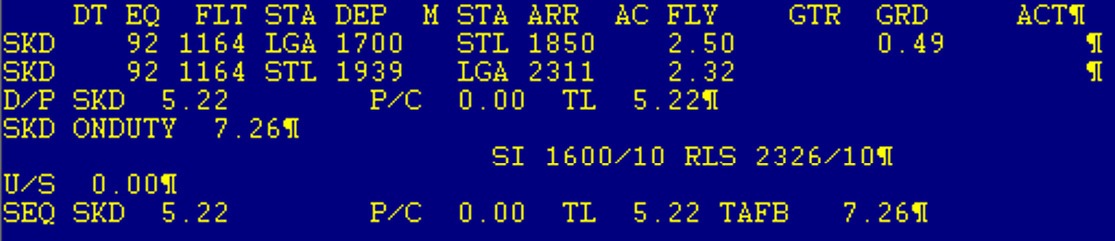
The trip below was a turn and the return segment cancelled. It was delayed to return the next morning:
This was the original sequence – paying 5.22
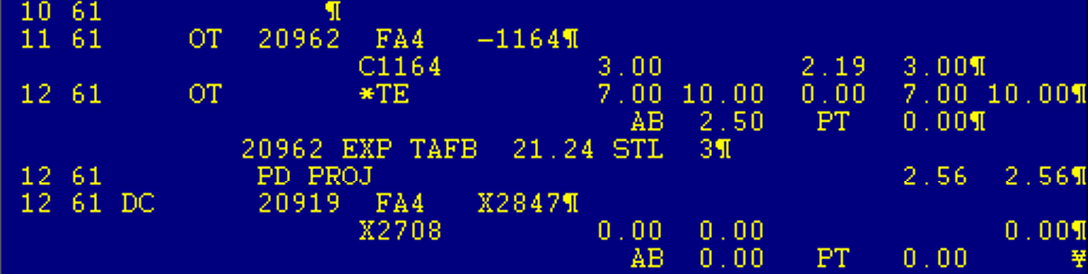
This is the delayed sequence – paying 10.00 as it is now a 2- day trip

Direct Conflict on Your HI-1
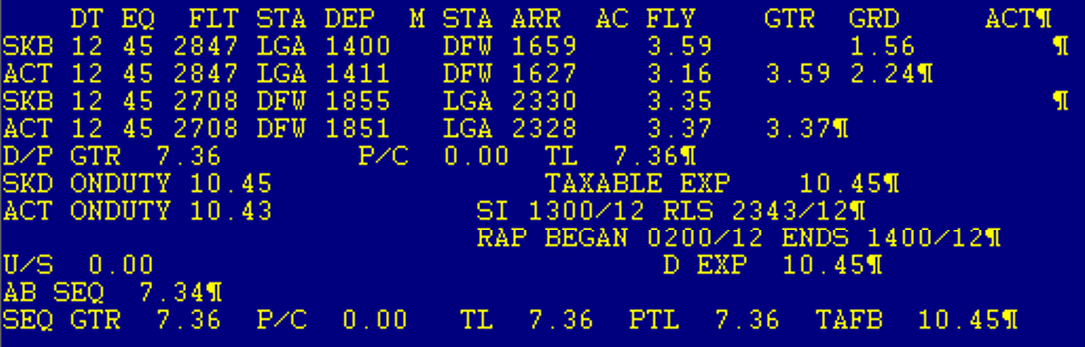
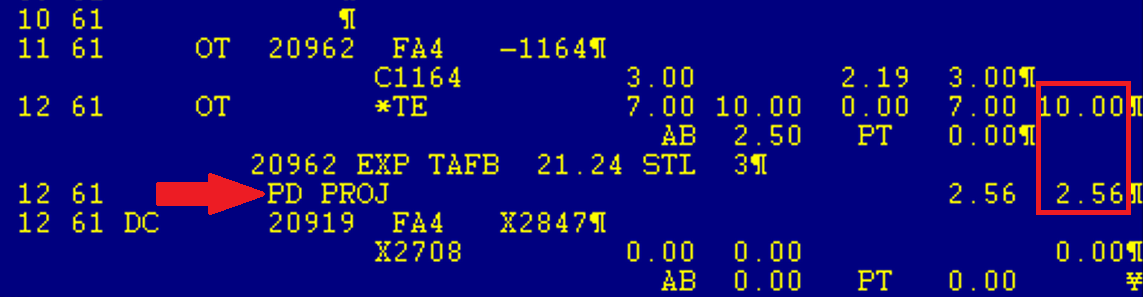
On the 11th – sequence 20962 was a turn that had a cancellation, extending the trip into the 12th. The Flight Attendant had another turn scheduled for the 12th – sequence 20919. Sequence 20919 on the 12th was removed with the DC code.
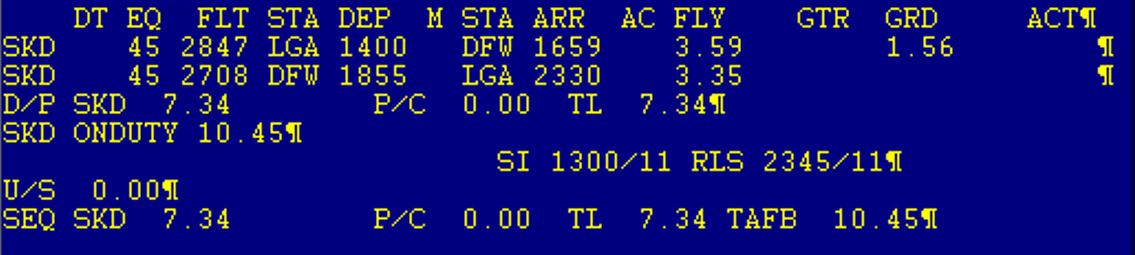
Sequence 20919 on the 12th was original paying 7.34
Direct Conflict – Pay Calculation
Here are the 2 sequences that the FA was originally scheduled to fly. They totaled 12.56 in pay for the 2 days of flying.
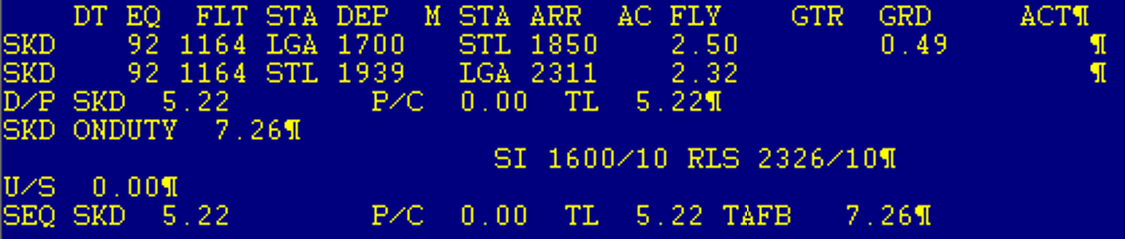
To make the FA whole, they would need to be paid 12.56. They received 10.00 from the first sequence that was delayed to the next day, and a PD PROJ of 2.56 was added to pay a total of 12.56.
Diversion Pay
When a flight is diverted and the aircraft is not blocked in at a gate, and/or passenger egress is prohibited, each Flight Attendant shall receive full flight time pay and credit for all such time on board. Such flight time will not be included in the block hour calculation as provided in Hours of Service, Section 11, nor will flight time pay and credit run concurrently with any holding time or ground time compensation as provided in Paragraph D. (CBA 3.N)
General Rules
- Any time a flight is diverted and FAs are held on board the aircraft with passengers without egress, whether at the gate or on the tarmac, diversion pay would apply.
- Egress is when all passengers are offered the opportunity to deplane and re-board. It does not apply when only select passengers are allowed to deplane.
- During the time diversion pay applies, legalities continue as if the flight is continuous and voluntary duty waiver (VE) does not apply if actual on-duty limitations are exceeded.
- If diversion pay stops, legalities would apply and if on-duty limitations are projected to be exceeded, Crew Tracking may offer VE to the crew, if applicable.
Diversion Pay Scenarios
| SCENARIOS | |
|---|---|
| FRA-DFW flight diverts to JFK for medical emergency and only the ill passenger is removed | *Flight pay and credit for all time on ground at JFK |
| PHX-DFW flight diverts to SAT due to DFW weather and sits on the tarmac for 3 hours before blocking in at the gate to allow egress for local SAT passengers only and then flight continues on to DFW | *Flight pay and credit for all time on ground at SAT |
| PHX-DFW flight diverts to SAT due to DFW weather and sits on the tarmac for 3 hours before blocking in at the gate to allowing all passengers to deplane and flight then defers overnight | *Flight pay and credit for all time on ground prior to blocking in at the gate in SAT |
| PHX-DFW flight diverts to SAT due to DFW weather and sits on the tarmac for 3 hours before air stairs are brought to the aircraft and used to egress for all passengers. | *Flight pay and credit for all time up until point that passengers were allowed egress |
| PHX-DFW flight diverts to SAT due to DFW weather and aircraft blocks in at the gate. Door is open and all passengers have ability to get on and off the aircraft as necessary. | No diversion pay, but crew would be eligible for ground time pay |
*Applicable Premiums to be included with flight pay and credit once programming is completed.
Compensation for Hotel Delays
Section 6.B.5 - Compensation for Hotel Delays
In the event of a schedule modification (such as a reschedule, cancellation, or other schedule change) that requires a hotel stay, the Company will provide a hotel assignment. However, if the Company fails to provide a hotel assignment within the specified timeframes, Flight Attendants (FAs) are entitled to compensation outlined below.
Compensation for Delayed Hotel Assignments
One-Hour Delay
If the Company fails to notify the Flight Attendant of a hotel assignment within one (1) hour from the later of: Block-in at the actual layover city or schedule modification (in accordance with the timelines outlined in Section 10.J.3.d or 10.J.4.c) the Flight Attendant shall be: paid at the rate of 150% of their normal pay rate, and credited at 100% for the duty period preceding the layover.
Three-Hour Delay
If the Company fails to notify the Flight Attendant of a hotel assignment within three (3) hours from the later of: Block-in at the actual layover city, or schedule modification (as per the timelines in Section 10.J.3.d or 10.J.4.c), the Flight Attendant shall be: paid at the rate of 150% for the entire sequence (instead of just the duty period), and credited at 100% for the entire sequence.
Procedure for Reporting Hotel Delay
If a Flight Attendant experiences a schedule disruption and the Company fails to assign a hotel room within the required timeframe, the following steps should be taken to report the delay and ensure proper compensation.
Wait for Repair
Wait for Repair
The Company has three (3) hours to repair the trip. Once the trip is repaired, the Company has one (1) hour to assign a hotel in FA Portal. (Note: There will not be a positive contact notification about the hotel assignment.) If the sequence is not repaired within three hours of the known disruption, proceed to the Crew Scheduling Error Pay procedure.
Capture Evidence of Delay
Capture Evidence of Delay
If a hotel is not assigned within one hour of the trip repair, capture screenshots of your FA Portal showing the lack of hotel assignment and HSS (Hotel Scheduling System) indicating the same.
Submit Direct Connect
Submit Direct Connect
1. Login to FA Portal and go to the Links section in the top banner.
2. Scroll down and click on Direct Connect.
3. Under the “Choose an Option” dropdown, select Hotel Delay.
4. Complete the required information and write a message clearly outlining the delay and issue you encountered.
5. Submit the form to report the hotel delay.
Monitor Your Pay Claim
Monitor Your Pay Claim
After submitting your Direct Connect, monitor your pay claim through the Direct Connect link.
If Claim is Denied
If Claim is Denied
If your claim is DENIED and you believe this is incorrect, please reach out to [email protected] with the following information:
— Any documentation supporting your pay claim.
— A copy of your Direct Connect submission.
— A copy of the response from American Airlines regarding your denial.
Procedure for Filing "Crew Scheduling Error Pay"
Submit Direct Connect for "MISC" Pay
Submit Direct Connect for "MISC" Pay
1. Login to FA Portal and go to the Links section in the top banner.
2. Scroll down and click on Direct Connect.
3. Under the “Choose an Option” dropdown, select MISC.
4. Fill out all required information and in the message section to Crew Compensation, note that you are requesting Crew Scheduling Error Pay due to your sequence not being repaired within three hours.
Monitor Your Pay Claim
Monitor Your Pay Claim
After submitting your Direct Connect, monitor your pay claim through the Direct Connect link.
If Claim is Denied
If Claim is Denied
If your claim for Crew Scheduling Error Pay is DENIED and you believe this is incorrect, please reach out to [email protected] with the following information:
— Any documentation supporting your pay claim.
— A copy of your Direct Connect submission.
— A copy of the response from American Airlines regarding your denial.
NOTE: A Flight Attendant who is eligible for the pay described above and later secures a hotel room (either independently or through the Company) will receive the applicable pay for either the entire duty period or the entire sequence, but not both.
Location Delay Incentive (LE Pay)
Section 14.M.7 Location Delay Incentive
When a Flight Attendant is delayed departing from an IPD station for more than ten (10) hours from the scheduled departure time for reasons such as mechanical or failure of an inbound aircraft to arrive, the Flight Attendant shall receive an incentive of an additional five (5) hours of pay and credit, including all premiums in addition to the value of the trip. Once the delay is twenty-four (24) hours or greater, an additional five (5) hours, including all premiums, will apply for each subsequent twenty-four (24) hours or fraction thereof. Once the crew reports for a delayed departure of twenty-four (24) hours or greater and the flight departs early or the door closes prior to the twenty-four (24) hours, the five (5) hours will not be rescinded. Should greater pay protection be provided through Illegal Through No Fault, Last Trip of the Month or Crew Substitution, the provisions of Paragraph M.7 may be waived to accept the greater pay protection.
Pay Adjustment Timeline
What is Pay Adjustment Timeline?
The Pay Adjustment Timeline (also known as the Crew Comp Timeline) is the when and where to look for pay claim adjustments from Pay Comp and how long you should wait before you file a pay claim in Direct Connect. Direct Connect claims are worked on a first come/first served basis usually within 5 - 7 business days. CLOSE OUT is worked the first 8 days of the month for the preceding month’s flying.
Understanding Pay/Assignment Types
Look through the chart to learn more about each Pay/Assignment Type, how it reflects in HSS/HI1, when charges are reflectd, and when to send a Direct Connect claim or search for a specific type using the search box below.
| Pay/Assignment Type | Reflects in HSS/HI1 as: | When are changes reflected? | When to send Direct Connect claim? |
|---|---|---|---|
| Callout Pay - Mid-Sequence | Callout Pay - Mid-Sequence | Line-item added as "PD PROJ"; OR seqs will show "GUAR PREM" | Following business day |
| Callout Pay - Sequence Origination | Callout Pay - Sequence Origination | Line-item added as "CALLOUT"; OR seqs will show "GUAR PREM". Report sequence with "25" add code to reflect sign-in/release. | Same-day, after released by Crew Scheduling |
| Direct Conflicts | TBD | TBD | TBD |
| Diversion Pay | Additional value to the right of the flight leg, showing as: "DIV" | 4-5 business days after scheduled sequence completion | 6+ business days after scheduled completion |
| Expenses (TAFB/Per Diem) | Expenses reflect in the header of the HI1 as: "D EXP" - Dom. Expenses; "I EXP" - Intl. Expenses; "MISC EXP" - Misc/Training Expenses; "TTL EXP" - Total Expenses | D EXP/ I EXP - Immediately after sequence completion; MISC EXP - Closeout | D EXP/ I EXP - Following business day; MISC EXP - After Payroll Closeout on 8th of the following month |
| Flight Departure Delays | Additional value to the right of the flight leg, showing as: "ATC, DEI, RCD, RFD" | Immediately after flight completion | If not added to HI1 - FAs need to contact their Flight Service Manager per the below line of communication: Flt Attendant > Flt Service Mgr > Chief Pilot > Pilot |
| Ground Time | Line-item added as "GRDTME" | Worked Mondays, Wednesdays, and Fridays 3-5 business days after submission | Must submit stay-late claim via Direct Connect or FOS immediately after event for consideration. |
| Holding Time | Line-item added as "HLDGTME" | 3-5 business days after submission | Must submit holding claim via Direct Connect or FOS immediately after event for consideration. |
| International Non-IPD Override | Line-item added as "INTOVRDE" | All entries should be in by closeout | After Payroll Closeout - 8th of the following month |
| International Premium Destination IPD Override | Line-item added as "IPDOVRDE" | All entries should be in by closeout | After Payroll Closeout - 8th of the following month |
| Location Delay Incentive (LE) | Line-item added as "LE PAY"; OR seq will show "LEABVGUA" | Worked every Monday & Friday *except on holidays Entries should reflect on HI1 5-7 business days after completion of the sequence. | 8+ days after sequence completion |
| Misaward Claims - TTS, UBL, ETB, ROTA/D | 5 - 7 business days after Direct Connect receipt | Submit Direct Connect as soon as possible but no later than 30 days as Crew Scheduling reviews all of these claims. | |
| Position Premium (Purser, Lead, Aft, Galley) | Line-item showing on the bottom of HI1, as "PP" and the applicable hourly rate (ex: "PP 2.50") | FAPP Program reflects flown and future flight legs immediately; Program will input cumulative hours as line-item on HI1 by closeout | After Payroll Closeout - 8th of the following month |
| Position Swap | FA"4" position flown | Immediate | If app is not able to be used, FA should contact their local Crew Service Center and the Duty Manager may submit the RF2042. In the rare case of a mid-flight illness of a crew member and the need for an extraordinary swap, the crew should contact Crew Tracking. |
| Random Drug/Alcohol Testing | Line item added as: "RANDOM" for random Drug test or "RANDOM A" for random Alcohol test | As soon as processed by Drug/Alcohol team | |
| Red Flag Sequence - Lineholder | Sequence displays "RED FLAG"; *Additional 50% added with a line-item as "RED FLAG" | Completion of sequence flown | 3 - 5 days after sequence completion |
| Red Flag Sequence - Reserve | Sequence displays "RED FLAG"; *Additional 50% added with a line-item as "RED FLAG" | Completion of sequence flown | 3 - 5 days after sequence completion |
| Settlement Agreement Protection | Line-item added as "PD PROJ"; OR/VF seqs will show "GUAR PREM". | Closeout | After Payroll Closeout - 8th of the following month |
| Speaker/Language Pay | Total, cumulative language hours will reflect in the header of the HI1 as "LANG". | Closeout | After Payroll Closeout - 8th of the following month |
| Stay Late Claim | Line-item added as "GRDTME" | Worked Mondays, Wednesdays, and Fridays 3-5 business days after submission | Must submit stay-late claim via Direct Connect or FOS immediately after event for consideration. |
| Training Pay - Instructor-Led | Training hours (ILT+WBT) added with line item as "TRNG"; Training expenses reflect under "MISC EXP" in the header of HI1. | Completion of training sequence Programmed within FOS | After Payroll Closeout - 8th of the following month |
| Training Pay - Online | Line-item added as "TRNG" | Closeout | After Payroll Closeout - 8th of the following month |
| Understaffing Pay | Flight number will be preceded by "S" (e.g. S101); Exception: Carryover sequence may show line-item added as "UNDERSTAFF". | Within 7 days of sequence completion, but no later than closeout | If after closeout, the "S" is not reflected next to the applicable flight number on the HI1, submit a Direct Connect |
| Voluntary Extension (VE) - Domestic | HSS will reflect "VE" add-code at leg-level. Additional 100% added with a line-item as "VE PAY". *Additional position premium added with line-item. | Crew Tracking will immediately update flight leg with "VE" add code. "VE PAY" entered during Closeout on HI1 | If "VE" is not reflected on HI3 immediately, contact Crew Tracking to update the flight leg |
| Voluntary Extension (VE) - International | HSS will reflect "VE" add-code at leg-level. Additional 100% added with a line-item as "VE PAY". *Additional position premium, INTL/IPD override added as line-item. | Crew Tracking will immediately update flight leg with "VE" add code. "VE PAY" entered during Closeout on HI1 | If "VE" is not reflected on HI3 immediately, contact Crew Tracking to update the flight leg. |
Pay Discrepency Procedures
Every month, the Crew Comp department looks at every Flight Attendant’s schedule to make corrections to sequences that were rescheduled due to disruptions or cancellations. Many of these things require some manual manipulation as the process is not automatic.
For example, when your arrival to a hotel is delayed in IROPS situations, your duty time for the day may need to be adjusted to reflect the accurate time you arrive at the hotel.
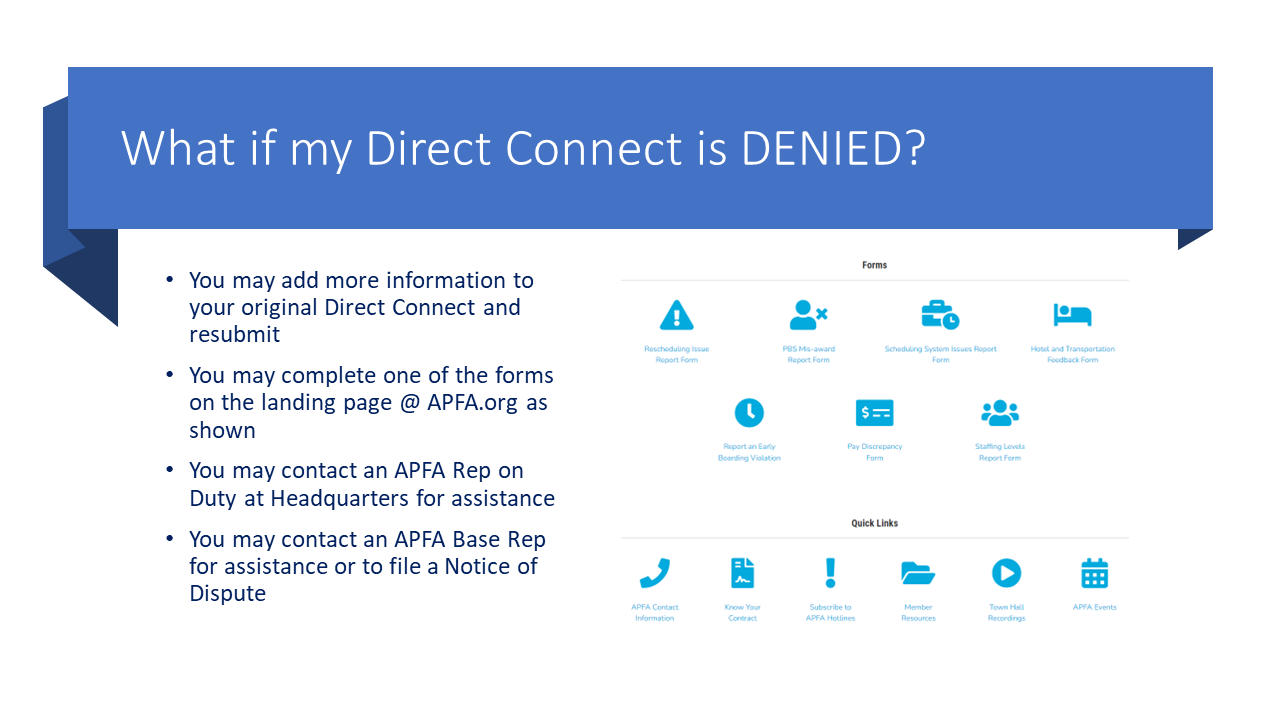
The first step with this would be to call crew scheduling and ask for the correct release time to be added to your HI3. If you are unable to get through to crew scheduling during your sequence, you can file a Direct Connect and ask for it to be corrected then. Should your Direct Connect be denied, you can follow up with APFA via a Pay Discrepancy Report Form for follow up by the Contract and Scheduling Department.


Pay Dates
| Pay Month | Pay Date | Pay Statement Visible | Pay Period |
|---|---|---|---|
| January |
Jan 15, 2026 Jan 30, 2026 |
Jan 13, 2026 Jan 28, 2026 |
December Mid-Month January End of Month |
| February |
Feb 17, 2026 Feb 27, 2026 |
Feb 12, 2026 Feb 25, 2026 |
January Mid-Month February End of Month |
| March |
Mar 16, 2026 Mar 30, 2026 |
Mar 12, 2026 Mar 26, 2026 |
February Mid-Month March End of Month |
| April |
Apr 15, 2026 Apr 30, 2026 |
Apr 13, 2026 Apr 28, 2026 |
March Mid-Month April End of Month |
| May |
May 15, 2026 May 29, 2026 |
May 14, 2026 May 27, 2026 |
April Mid-Month May End of Month |
| June |
Jun 15, 2026 Jun 30, 2026 |
Jun 11, 2026 Jun 26, 2026 |
May Mid-Month June End of Month |
| July |
Jul 15, 2026 Jul 30, 2026 |
Jul 13, 2026 Jul 28, 2026 |
June Mid-Month July End of Month |
| August |
Aug 17, 2026 Aug 28, 2026 |
Aug 13, 2026 Aug 26, 2026 |
July Mid-Month August End of Month |
| September |
Sept 15, 2026 Sept 30, 2026 |
Sept 11, 2026 Sept 28, 2026 |
August Mid-Month September End of Month |
| October |
Oct 15, 2026 Oct 30, 2026 |
Oct 13, 2026 Oct 29, 2026 |
September Mid-Month October End of Month |
| November |
Nov 16, 2026 Nov 30, 2026 |
Nov 12, 2026 Nov 25, 2026 |
October Mid-Month November End of Month |
| December |
Dec 15, 2026 Dec 30, 2026 |
Dec 11, 2026 Dec 29, 2026 |
November Mid-Month December End of Month |

APFA Headquarters
1004 West Euless Boulevard
Euless, Texas 76040
M-F: 9:00AM - 5:00PM (CT)
Phone: (817) 540-0108
Contract & Scheduling Desk
M-Th: 9:00AM - 5:00PM (CT)
Phone: (817) 540-0108
Live Chat Messaging
Fridays: 9:00AM - 5:00PM (CT)
Currently, no scheduled events...