

PBS for Reserves
Resources for Reserves Bidding in PBS
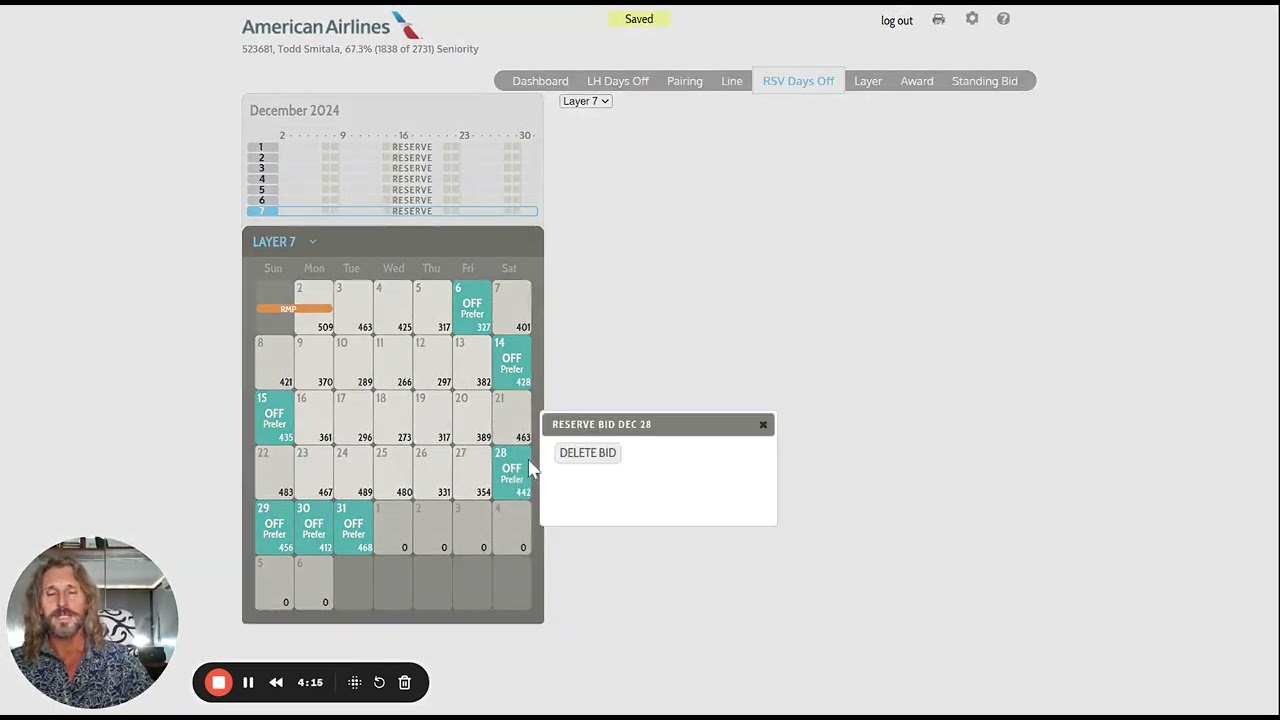
7 Layer Reserve Bid Walkthrough

Check Your Status: PBS Dashboard
Ensure You Enter Your Preferences on the Reserve Calendar
Step 1: Enter all 12 Off Days in Layer 6 or 7
Step 2: Prioritize Your Off Days Across Upper Layers
Understanding How PBS Processes Your Bid
Check Your Status: PBS Dashboard
- Navigate to the PBS Dashboard.
- Locate your status:
-
- If "Line Holder," you'll bid for a line holder schedule.
- If "Reserve," you'll bid for a reserve line.
- However, If it says "Reserve" but you used the LRD tool to toggle to Line Holder, you may still become a line holder - In this case, it's recommended that you bid 7 layers of each: Reserve and Lineholder.
- Double Bidding Tips (if unsure of status):
- Line Holder Bid in case you are afforded Lineholder status when PBS processes your bid.
- Reserve Bid to ensure coverage if you remain on reserve.
- This approach prevents being left without any preferences for the final bid type.
- Double Bidding Tips (if unsure of status):
Ensure You Enter Your Preferences on the Reserve Calendar
Step 1: Enter all 12 Off Days in Layer 6 or 7
Step 2: Prioritize Your Off Days Across Upper Layers
Understanding How PBS Processes Your Bid
End of the Month Reserve Bidding Topics

APFA Headquarters
1004 West Euless Boulevard
Euless, Texas 76040
M-F: 9:00AM - 5:00PM (CT)
Phone: (817) 540-0108
Contract & Scheduling Desk
M-Th: 9:00AM - 5:00PM (CT)
Phone: (817) 540-0108
Live Chat Messaging
Fridays: 9:00AM - 5:00PM (CT)
Currently, no scheduled events...