

UBL
Unsuccessful Bidder's List
UBL Hotlines
3.19.26 – Contract Implementation Update #54: Reserves in TTS and UBL
One of the biggest enhancements for Reserves has arrived. Beginning March 20, 2026, Reserves will be able to submit TTS ballots for April sequences on scheduled days off! What is TTS? APFA.org has resources available when you have questions
3.19.26 – Contract Implementation Update #54.1: Reserves in TTS and UBL ***Correction***
Thursday, March 19, 2026 Contract Implementation Update #54.1: Reserves in TTS and UBL ***Correction*** One of the biggest enhancements for Reserves has arrived. Beginning March 20, 2026, Reserves will be…
9.30.25 – Contract Implementation Update #44: Increased UBL Transparency Starts Today!
In this update, we will cover: 10.F.2.c and 12.J.1 – New UBL Report (Open Time Distribution and Transferred trips); 10.F.4.b – UBL Auto Runs to 1900
9.29.25 – Contract Implementation Update #43: UBL Trip Improvement Returns! (10.F.1.f)
Beginning tomorrow, UBL will begin processing same-day origination trades for the next day up until 1500 HBT. You will be able to trade your sequence for the next day for any other sequence originating on the same day as long as it is the same number of days or greater.
6.26.25 – Contract Implementation Update #29: FAPP Update / TTS / UBL Red Flag / Default Satellite Filtering in ETB
The Flight Attendant Premium Pay (FAPP) has been updated to include Boarding Events. By accessing Crew Portal > Links > FA Premium Pay, on the lefthand side there is an option for Boarding Events.
3.14.25 – Contract Implementation Update #17: Specific Red Flag Bidding in TTS and UBL
Specific Red Flag Bidding in TTS and UBL will be implemented early, beginning on March 18th, 2025. In addition to current Red Flag generic bidding already in effect, you will now have the option to bid for Red Flag Only on specific sequences in TTS and UBL (CBA 10.H.8).
6.20.21 – Unsuccessful Bidder’s List Processing Issues This Morning
Sunday, June 20, 2021 Unsuccessful Bidder’s List Processing Issues This Morning The Company has advised APFA that there was a problem with the Unsuccessful Bidder’s List (UBL) process this morning, June…
12.18.20 – Trading into Red Flagged Sequences via TTS
Friday, December 18, 2020 Trading into Red Flagged Sequences via TTS The Company now offers red flag flying within the Trip Trade System (TTS), giving you the ability to trade…
One of the biggest enhancements for Reserves has arrived. Beginning March 20, 2026, Reserves will be able to submit TTS ballots for April sequences on scheduled days off! What is TTS? APFA.org has resources available when you have questions
Thursday, March 19, 2026 Contract Implementation Update #54.1: Reserves in TTS and UBL ***Correction*** One of the biggest enhancements for Reserves has arrived. Beginning March 20, 2026, Reserves will be able to submit TTS ballots…
In this update, we will cover: 10.F.2.c and 12.J.1 – New UBL Report (Open Time Distribution and Transferred trips); 10.F.4.b – UBL Auto Runs to 1900
What is the UBL?
The Unsuccessful Bidders List (UBL) runs immediately after TTS and will only process requests for sequences that originate on the current day and the next day in Open Time.
Example: After TTS runs on Monday night (2300-0400HBT), the UBL will only process requests that involve Tuesday and Wednesday operations.
Allowed Transactions in UBL
Understanding UBL Transactions
Trying to figure out IF or HOW you can trade today's trip for another trip tomorrow? Not sure of what's allowed for UBL trades? Learn more about UBL transaction types how they work using the visual walk through below.
UBL Awards
When Does it Run?
There are two different types of UBL runs - the type of run will depend on the time of day.
Auto Awards
UBL runs that occur for sequences for the next day (before 1900HBT)
Example: TTS/UBL opens at 0400HBT on Sunday. Every sequence that opens between the hours of 0400 and 1500HBT Sunday or any sequence that originates on Monday would be an Auto Award.
These awards do not require a phone call from Crew Scheduling.
Despite 1500HBT being the cutoff, Scheduling usually performs the last UBL run before ROTA by 1445
Manual Awards
For any same-day sequences or after 1900HBT (for any next-day sequences).
Example: TTS/UBL opens at 0400HBT on Thursday. Manual UBL Awards would be for:
- All sequences that open on Thursday (same-day operation).
- All sequences that originate on Friday (next day) that become open after 1900HBT on Thursday (after ROTA starts).
(ALL Manual UBL Awards require a phone call from Crew Scheduling unless waived or out flying.)
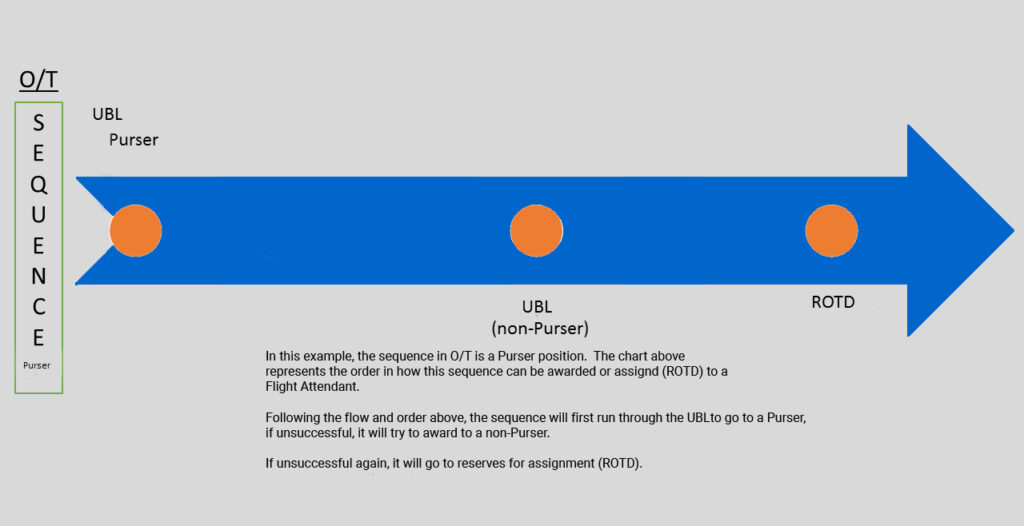
Purser & Speaker Processing with UBL
Here's how UBL processes Flight Attendants with Purser and/or Speaker qualifications.



UBL Generic Bid: Pickup
The UBL Generic Bid-Pickup option allows you to pick-up trips the day-of or the next day using generic properties versus choosing specific sequences that are operating the day-of or next day.
The benefit to allowing generic UBL requests versus specific is that if a new sequence with an unpublished bid number becomes open, you will have the opportunity to pick-up the sequence without having to monitor Open Time versus selecting the specific sequence number.
Another benefit is inputting a generic bid for Red Flag sequences without having to monitor Open Time.
Note:
Picking up a generic red flag sequence will not drop a sequence from your line if they overlap.
UBL Generic Bid-Pickup request will only allow you to pick-up from open time. If you select a sequence on your line you will not have the option to select generic—you can only use the generic bid on days without a sequence.
Calendar View Options
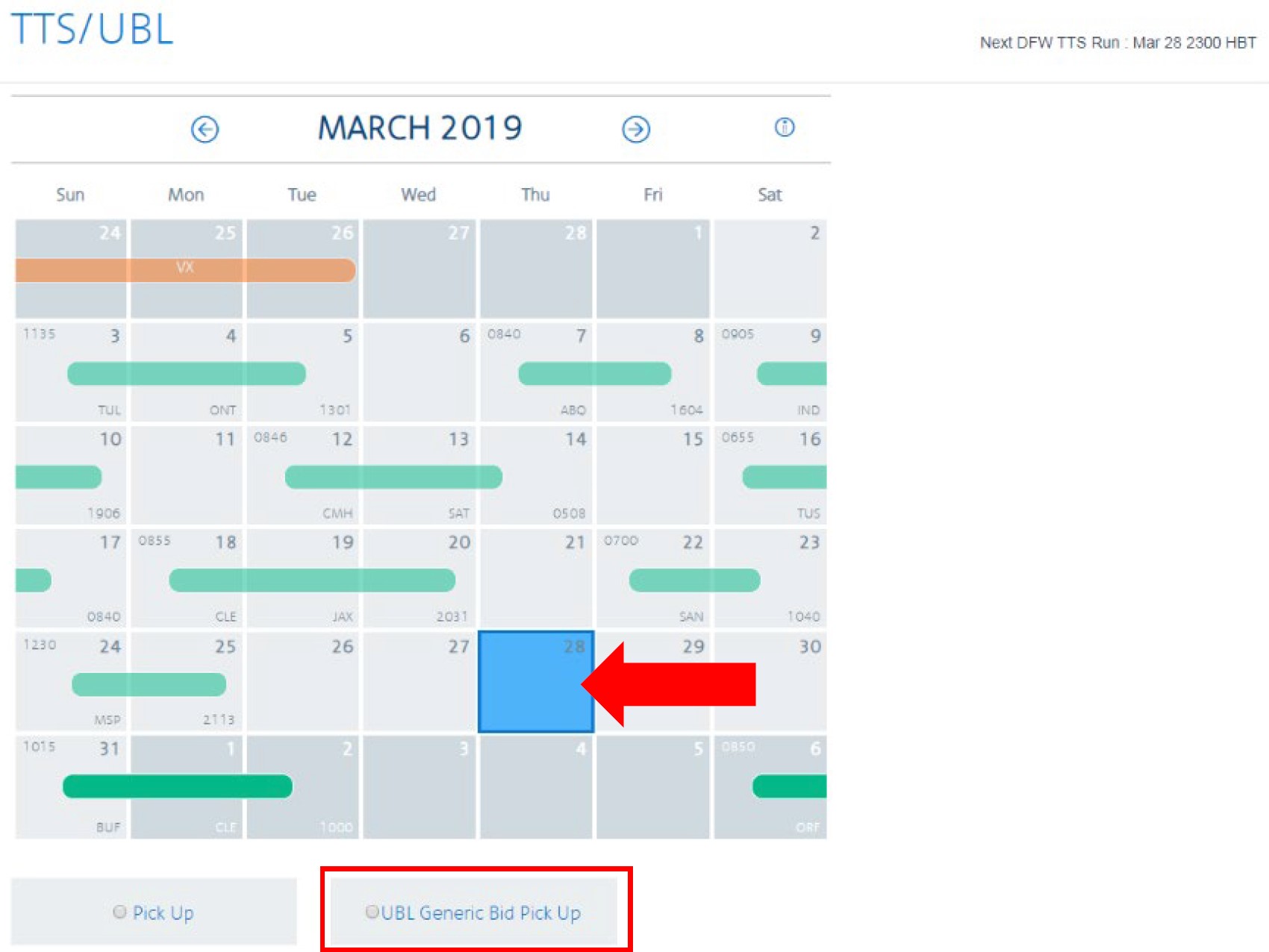
View with NO Sequence on Date
When a date is selected on the calendar that doesn’t contain a sequence, the UBL Generic Bid-Pickup option will appear to allow you to enter generic criteria.
You will also have the option to select Pick-up which allows you select specific sequences.
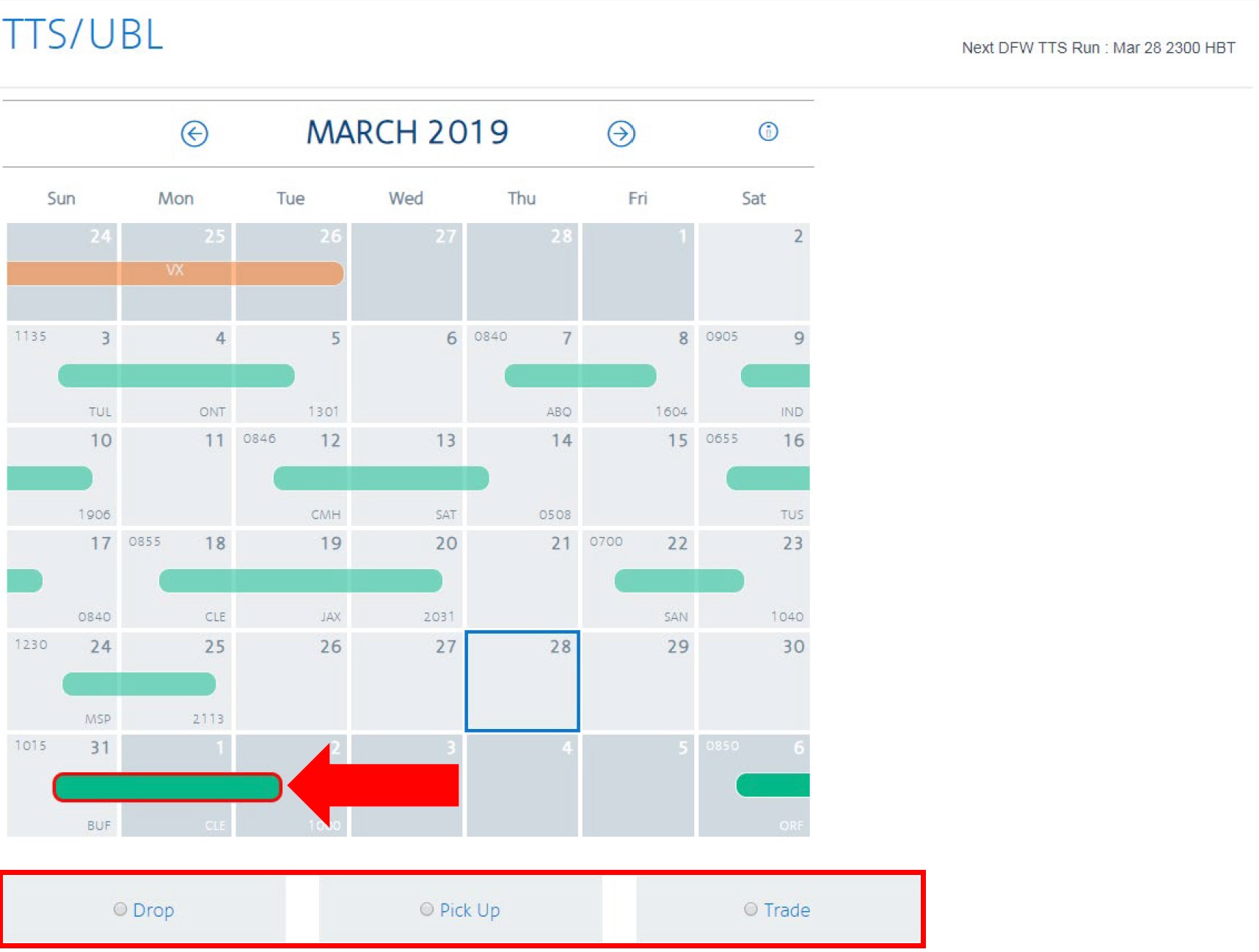
WITH Sequence on Date
When a date is selected on the calendar that contains a sequence, the UBL Generic Bid-Pick Up option will not appear.
You will also have the option to select: Drop, Pick Up or Trade which allows you to select specific sequences.
Generic UBL Search & Bid
After you select the UBL Generic Bid - Pickup option from the calendar screen, you'll be directed to the Search page.
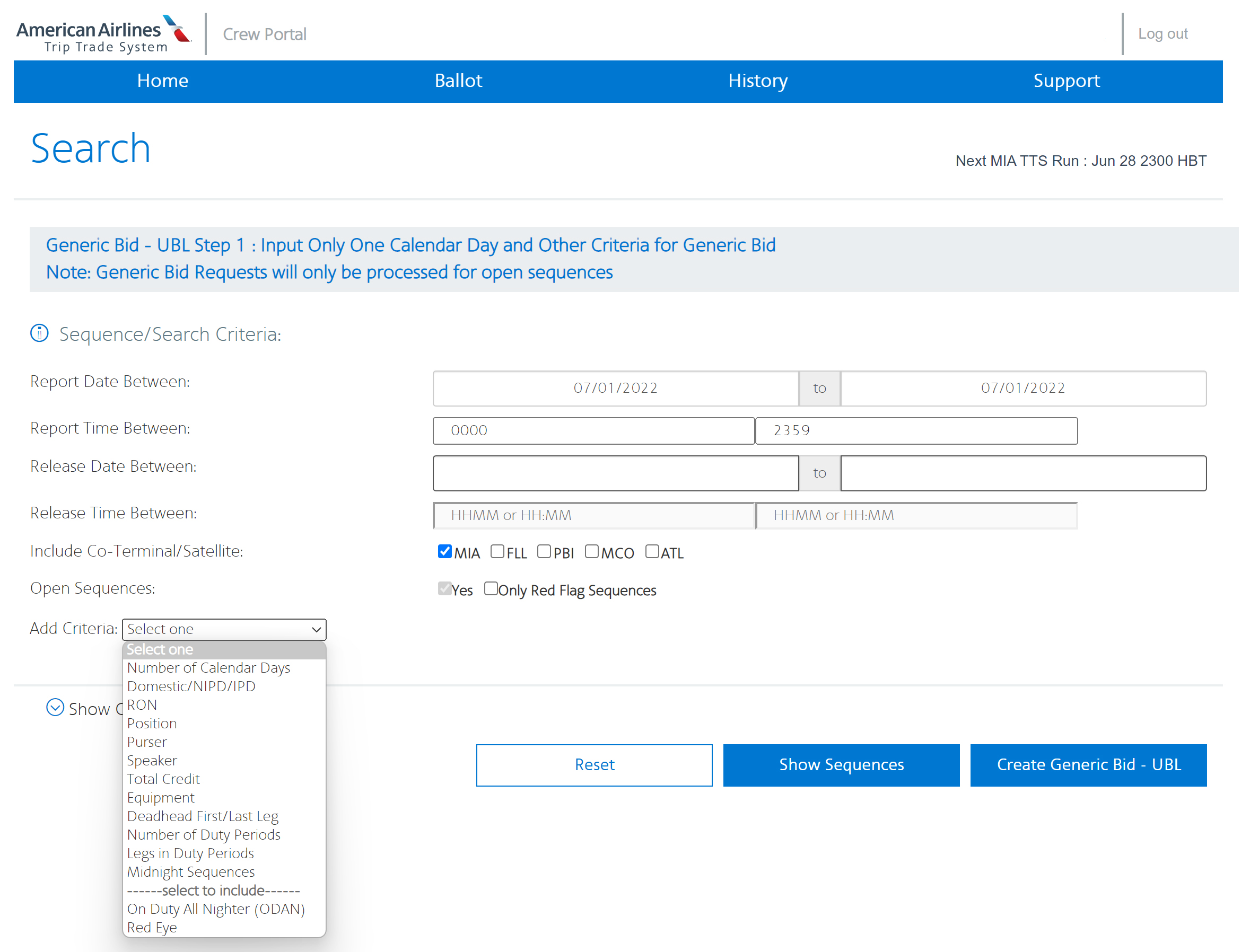
Select the date you’d like to pick-up a sequence.
Note: You’ll only be able to select a single calendar day (i.e. 28Mar to 28Mar, not 28Mar to 29Mar)
Enter in any timeframe between 0000-2359 for your desired report time.
Enter in any date you wish for the sequence to be released.
Enter in any timeframe you wish for the sequence to be released
Select a co-terminal(s), satellite or home base you wish to depart from.
Note: At least one option must be selected
Yes will be auto-populated and cannot be unchecked. Select Only Red Flag Sequences if you wish to only pick-up Red Flag.
Select any of the available criteria from the drop-down. You must select ODAN and/or Red Eye if you wish to include those preferences for an award.
Hint: If selecting “Deadhead First/Last Leg” and you choose both, these are read as OR
Will reset all of the criteria above.
Select this option to see any currently open sequences that match your criteria.
Hint: If you see a sequence you wish to not fly, see if you can add an additional criteria to narrow your options
Select this button to add the criteria you added to your ballot.
Unique to Generic UBL
Adding either option does not mean you’re requesting just an ODAN or Red Eye, but instead you’re adding it to the pool for a possible award.
NOTE: The ability to select only an ODAN and/or Red Eye will be a future enhancement.
Any generic UBL requests will not count toward the limits of requests or sequences/positions.

When you select Show Sequences, remember that what you are viewing currently can change and more sequences can open up later.
Just because you don’t see a sequence open when searching now, does not mean it won’t open up later—this includes co-terminals and satellites! It is very important to pay close attention to the criteria that you are adding.

Within a current request you are able to request other choices by selecting + Add Choices. If you select this option you are able to rank your choices based off the different criteria you have set.
Example:
If you wish to request a sequence worth higher time versus placing a credit range you could:
Choice 1 - 1 day worth 9 hours
Choice 2 - 1 day worth 8 hours
Choice 3 - 1 day worth 5 hours min to 7 hours max
NOTE: you cannot rank within a choice
Within your ballot you can still rank and reorder your requests based off a specific sequence or a generic sequence request.
Example:
Request 1 - PICKUP
Choice 1: Sequence 44356, position 3
Choice 2: Sequence 21145, position 3
Request 2: Generic 3 day
Request 3: Trade Sequence 8878 on 24Mar for Sequence 5432 on 23Mar
- Once you create a Generic UBL request and have an origination day selected, you will not be able to add another date inside of that request.
- If multiple sequences match your request during a UBL auto-award, the system will randomly award you a request if a sequence in open time matches. If you wish for something more specific you will need to add more criteria to your bid(s) to narrow an award.
- If a UBL manual award processes and several sequences in open time match, Crew Scheduling will award either the earliest report time or the highest time sequence.
- At the time of a generic UBL award, you will be required to accept the award and will not be able to call Crew Scheduling to be changed onto another sequence that matches your criteria.
Understanding your Options on the Ballot Page
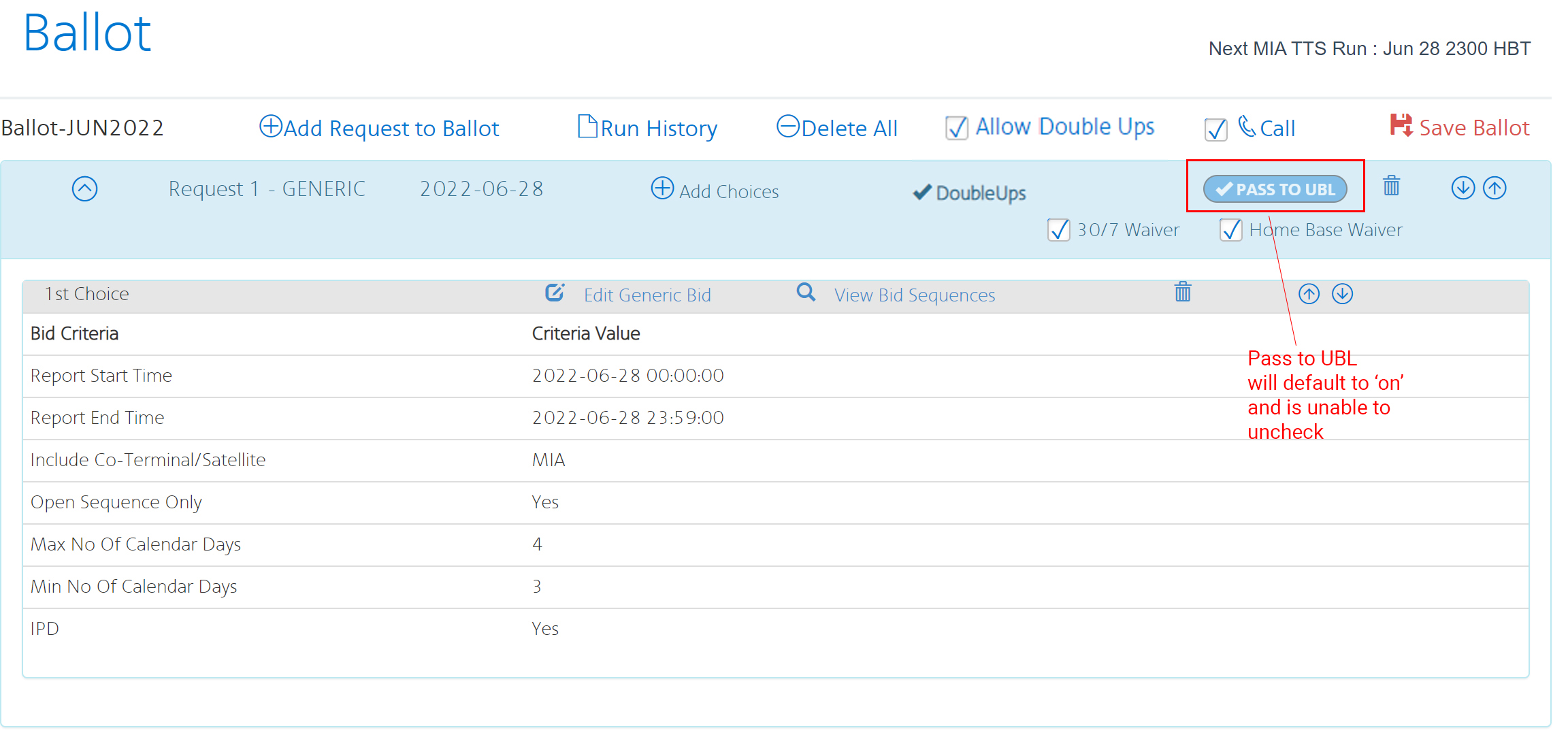
Select this option if you wish to add another generic bid option to your ballot on the selected date of the original request.
Select this option to see the run history of the selected request.
Select this option to delete all requests in the current request.
Select this option if you wish to be awarded a double up.
NOTE: This will not allow multiple sequences
If checked (Default) you will receive a call from Crew Scheduling if after 1900HBT (Manual UBL).
If you don’t wish to receive a phone call uncheck this option.
NOTE: You will not receive a call from Crew Scheduling if you are on legal rest, on a sequence, or uncheck this option.
Designates the request type
Generic - Drop - Trade - Pickup
Select this option if you wish to include another generic request.
A pre-selected waiver that is checked to allow awards that exceed 30/7. If awarded, the 30/7 waiver will be waived for the remainder of the month.
NOTE: Even if your 30/7 is waived for the month, you can control your generic UBL pick-up awards by unchecking the 30/7 waiver. This allows you to not receive an award that will put you over 30.
A pre-selected waiver that is checked to waive the contractual home base rest to FAR minimum.
If this is present, indicates that you have checked the 'Allow Double Ups' box above.
A pre-selected option for generic UBL. This option cannot be unchecked when placing a generic bid.
Select this option if you wish to change the criteria of the currently select generic bid criteria.
Select this option to view currently open sequences that match the selected for generic criteria.
NOTE: The sequences being displayed are currently open and other sequences may open later.
Select this option to delete the current request in the ballot.
Use these options to move the current request either up or down within the ballot.
Generic UBL in Practice: Scenarios
Related Resources

APFA Headquarters
1004 West Euless Boulevard
Euless, Texas 76040
M-F: 9:00AM - 5:00PM (CT)
Phone: (817) 540-0108
Contract & Scheduling Desk
M-Th: 9:00AM - 5:00PM (CT)
Phone: (817) 540-0108
Live Chat Messaging
Fridays: 9:00AM - 5:00PM (CT)
Currently, no scheduled events...