

ROTD
Responsibilities While on a RAP
Crew Scheduling should not call you before your RAP begins; however, the Contract does not prohibit them from doing so. If they call you before your RAP begins, you are not required to answer or return the call.
Acknowledgement
At the start of your RAP, you are responsible to check your schedule and acknowledge an award/assignment given before your RAP starts.
- Exception: RAP A is not required to check their schedule before their RAP starts (Scheduling will always call RAP A reserves, regardless if the award/assignment was given before or during their RAP)
- Scheduling is required to call when giving an award/assignment during a RAP (all RAPs) unless electronically acknowledged by the Flight Attendant.
Scheduling's Assignment Limitations
What's the worst they can do to me?
The sequence report time of an assignment may be no later than 2-hours after your RAP ends, but Scheduling must call you during your 12-hour RAP with the assignment.
How much time do I have to report after Scheduling contacts me?
After speaking with Crew Scheduling, you have two hours (three hours in co-terminal bases) to report for an assignment.
- After the start of your RAP, Scheduling will always make positive contact.
- Once Scheduling has initiated the first call and left a voicemail, you have 15 minutes to return the call or acknowledge via Crew Portal.
- Once acknowledged, the 2 hour (3 hour co-terminal bases) clock starts.
Example: Adam is a reserve in ORD and his RAP B started at 0600 HBT. Scheduling called Adam at 0700 HBT to give him a sequence assignment. Adam has until 0715 HBT to acknowledge the sequence. If Adam calls Scheduling back and makes positive contact with a Scheduler at 0710 HBT, Adman’s 2 hours to report starts at 0710 HBT, resulting in a 0910 HBT report.
- Your report time may be after the sequence report time; however, your duty day begins at the report time of the sequence.
- If due to a late notification of an assignment, your report time is after the scheduled sequence report time, a late report (LR) automatically generates. In this case:
- A message is sent to the Base, excusing the LR.
- Check your My View/HI10M in this case to ensure the LR is removed.
- Follow up with your AFSM if the LR is not removed or excused.
- If you arrive within the allotted 2 (3) hours following notification, but the aircraft doors have closed, the assignment is removed from your schedule, and you are returned to your original RAP.
- If assigned to another sequence during your RAP, your duty day starts at the report time of the originally assigned sequence
- If unassigned, Crew Scheduling will add a RPT sequence and callout pay when your RAP ends. When a RPT sequence is added to your schedule, legal rest must follow. The legal rest period (12 hours) begins at the release time of the RPT sequence. If your next assignment is a RAP, the RAP start time will be modified.
*ASG clicks are automatically removed by FOS when an assignment is removed. Contact a Scheduling SOD to have the ASG clicks restored
What happens at the end of my RAP if they don't use me?
You are released at the end of your RAP, if unassigned. If your RAP precedes a day off (FD/GD), the RAP will end no later than 2359.
- If you would like to extend your RAP's end time, contact Crew Scheduling. If you would like. RAP extensions cannot overlap your next scheduled RAP. To remove your RAP extension request, contact Crew Scheduling.
ROTD Processing
ROTD is the system that processes all sequences/standbys that open after ROTA has completed and after first going through UBL. ROTD will process any number of times a day, depending on when sequences/standbys becomes available for award/assignment for the same activity window (0200-0159). At times, ROTD will process for both today’s and tomorrow’s assignments.
Processing
How can I find out when they assigned me?
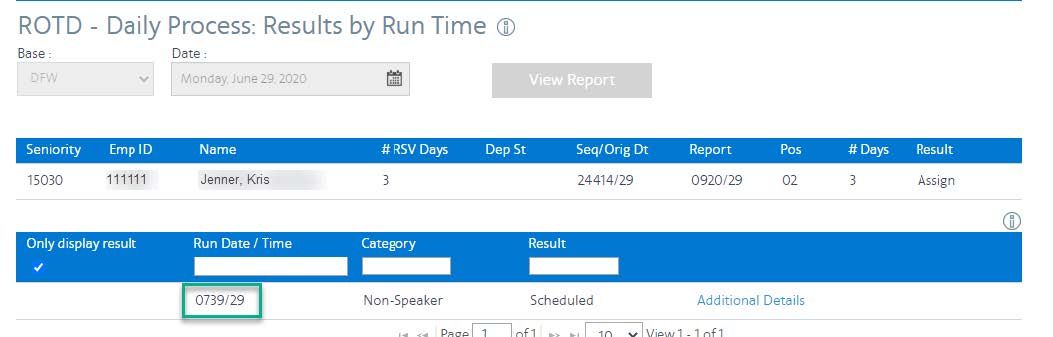
You can view the time the assignment was made by clicking your underlined employee number in the ROTD Daily Process Results.
Example: This sequence was assigned on the 29th at 7:39am.

Logic: How does ROTD process awards/assignments?
ROTD processes based on RAP, grouping, clicks, seniority and legalities
Assignment and Award
When awarding/assigning a sequence ROTD will use an aggressive reserve in the earliest RAP. Next, it will assign to a non-aggressive reserve. Award and assignments will be given based on the following factors in order:
AWARD Logic Factors
RAP
RAP
Seniority
Seniority
Legalities
Legalities
vs
ASSIGNMENT Logic Factors
RAP
RAP
Grouping
Grouping
Clicks
Clicks
Seniority
Seniority
Legalities
Legalities
Assignments into FD/GD
- You cannot be assigned into a GD.
- Before assigning you into a FD, ROTD must assign all Reserves on available days and Aggressive Reserves.
- You cannot be assigned into a FD (and may refuse the assignment) if there are no days of availability where the FD can be restored. If you choose to accept the assignment, you will receive the value of the reserve day above guarantee (PNC).
- Pay associated with an assignment into a FD is pay and credit. You may have the day off restored on a mutually agreed upon date or receive the daily Reserve rate above guarantee (pay no credit). Contact Crew Scheduling within 48 hours of your return.
- The JCBA step used to make assignments is indicated on the ROTD Daily Process Report.
ROTD and Speaker Processing
- Speakers reserves are held for sequences that match their speaker qualification.
- However, once their RAP begins, they will be processed with non-speakers if they’re not available for the amount of days needed to fly sequences that require their speaker qualification.
- Keep this in mind when reading the Daily Call Out Report. It's a good idea to check if reserves ahead of you in the call out order have Speaker qualifications - it may affect the call out order.
Will ROTD assign/award to a Reserve on a RAP or a Standby?
It depends on how close to departure a sequences opens. Here are the processing steps for both cases:
ROTD Steps of Processing
Order of Assignment
(CBA 12.K.2)
ROTD First tries to cover the sequence or standby. If ROTD was unsuccessful with Order of Assignment it will move on to Month to Month Integration. (View all steps below)
Month to Month Integration (CBA 12.R)
If ROTD was unsuccessful with Order of Assignment 12.K.2 it will move on to Month to Month Integration. If ROTD is still unsuccessful it will try Priority of Assignment (View all steps below).
Priority of Assignment
(JCBA 12.N)
If ROTD is still unsuccessful with Order of Assignment 12.K.2 and Month to Month Integration 12.R it will try Priority of Assignment (CBA 12.N) (View all steps below).
Order of Assignment (CBA 12.K.2) Processing Steps
ROTD First tries to cover the sequence or standby according to these setps:
For sequences that open more than 2 hrs prior to scheduled departure time (3 hrs+ co-terminal bases)
After running through UBL for lineholders, sequences remaining open are awarded/assigned to Reserves through ROTD in the following order
Step 2
Step 1 - Award Aggressive Reserves on available days (12.K.2.c)
Sequence & standby, double-up & multi-sequence
- In seniority order within RAP (If the sequence falls within two RAPs, the earliest RAP is processed first).
- If a reserve does not have a RAP, they will be awarded following those on a RAP based on an assumed RAP
Example: those who bid to double up but don’t have a RAP
Step 3
Step 2 - Assign Reserves in the Grouping (12.K.2.d)
- If the sequence falls within two (2) RAPs, the earliest RAP is assigned first.
- Reserves are listed in each RAP by Grouping- least to most ASG clicks, in inverse seniority order
Step 3
Step 3 - Assign Reserves from the next highest Grouping of available days (12.K.2.e)
Once the appropriate RAP is exhausted, repeat steps 1-3 with the next appropriate RAP until filled.
Step 3
Step 4 - Award Aggressive Reserves who bid to fly into FD/GD, followed by Aggressive Reserves on FD/GD (12.K.2.f)
- In Seniority order, Aggressive Reserves on a RAP first.
- Next, Aggressive Reserves already on FDs/GDs who do not have a RAP, in seniority order (with Scheduling's consent)
Step 3
Step 5 - Assign Reserves on a RAP holding a future ROTA/ROTD assignment for the next day who can operate the sequence in entirety (12.K.2.g)
- In seniority order within RAP (If the sequence falls within two RAPs, the earliest RAP is processed first).
- Future assignment is dropped
- This will not force a Reserve into a FD/GD.
Step 3
Step 6 - Assign Reserves on a RAP, assigning into 1 FD (12.K.2.h)
- In seniority order within RAP (If the sequence falls within two RAPs, the earliest RAP is processed first).
Step 3
Step 7 - Assign Reserves on a RAP, assigning into 2FDs (12.K.2.i)
- In seniority order within RAP (If the sequence falls within two RAPs, the earliest RAP is processed first).
Step 3
Step 8 - Assign Reserves on a RAP, assigning into 1 FD, holding an ETB sequence (12.K.2.j)
- In seniority order within RAP (If the sequence falls within two RAPs, the earliest RAP is processed first).
- ETB sequence is dropped, pay protection does not apply
Step 3
Step 9 - Assign Standby to a Reserve based on a RAP, followed by clicks
- Must be available for the minimum days required
Label
Step 10 - If ROTD is unable to assign sequence with Order of Assignment 12.K.2, it will try Month to Month Integration 12.Q
If ROTD was unsuccessful with Order of Assignment 12.K.2 it will move on to Month to Month Integration.
Month to Month Integration (CBA 12.S) Processing Steps
If ROTD was unsuccessful with Order of Assignment 12.K.2, it will try these steps:
Step 1 - Assign Reserves going into a lineholder month with no conflict (12.S)
Step 2
Step 2 - Assign Reserves going into a lineholder month with a conflict (12.S)
- Sequence will be dropped and pay protected
Step 3
Step 3 - Assign Standby to a Reserve going into a lineholder month
- Based on RAP, followed by clicks
If ROTD was unsuccessful with Order of Assignment 12.K.2 and Month to Month Integration 12.S it will try Priority of Assignment.
Priority of Assignment (CBA 12.O) Processing Steps
If ROTD was unsuccessful with Order of Assignment 12.K.2 and Month to Month Integration 12.Q it will try these steps:
Priority of Assignment (POTA):
The order Scheduling will use Flight Attendants to cover all sequences and standby shifts which remain open after future/daily processes (12.M.1-5)
Step 2
Step 1 - Out of Base Reserves
Sequence & standby, double-up & multi-sequence
- Open sequences/standbys will be redeveloped into new sequences/standbys that can be transferred to another base. Crew Scheduling will add deadheads prior to processing them through UBL and then ROTA/D at a new base for assignment.
- ROTA/ROTD will process the trips to avoid conflicts with GDs an where possible, FDs.
Step 3
Step 2 - Reserves on a RAP with a Previous Assignment
- In inverse seniority order, Scheduling will assign a reserve whose original assignment reports at 1200 or later and can fly the sequence without touching FDs.
- If the above is not available, the sequence will be assigned to a reserve in inverse seniority whose original assignment reports at 1200 or later and will be flown into 1 FD, then 2 FDs, until exhausted.
- If the above is not available, a previously assigned unreleased reserve that volunteered to fly into GDs/FDs, will be assigned into only the FD.
Step 3
Step 3 - Inbound Reserve
- If the above is not available, at the option of Crew Scheduling, assign to an inbound reserve who is legal and available.
- If this is happening to you, be sure to verify that Scheduling has exhuasted all previous steps from Order of Assignment (12.k.2), Month to Month Integration (12.Q) and Steps 1 & 2 in POTA (12.M) first.
Step 3
Step 4 - Reserve on FD
- If above is not available, then assign in inverse seniority order to a Reserve on a FD.
- A reserve that has been released and is on a FD is not required to answer a call from Scheduling.
Step 3
Step 5 - Lineholder on Days Off
- If the above is not available, Scheduling will assign remaining open sequences in inverse seniority order to a lineholder who is on a day off.
- However, the following rules will be applicable to assignment:
- Sequences will not be assigned to a lineholder who is on vacation or day(s) off that touches vacation.
- A lineholder cannot be involuntarily assigned more than twice per bid period.
- Scheduling can only call the lineholder’s contact number when making an involuntary assignment.
- Remember, you are not required to answer a call from Scheduling on your day off.
ROTD Bidding (Aggressive)
ROTD Waivers
Satellite Bidding in ROTD
- Open satellite sequences are awarded to Lineholders through TTS, followed by UBL.
- ROTA will not process satellite sequences
- ROTD will only award the trip.
- If the satellite sequence remains open during the daily process, Scheduling will modify the sequence with the appropriate deadheads from the main base and process back through the UBL, followed by ROTD for assignment
How do I bid for a satellite sequence?
You must bid in the “aggressive bids” or “standing bids” (ROTD) tab to have the opportunity to be awarded a satellite trip.
ROTD Results and Reading Reports
- RSVCOT
- Speakers
- They can't be assigned before the start of their RAP.
- Time you are looking at the report
- During ROTA processing? Groupings may change after ROTA award...
Assignment Sequence
The callout order is not exact. RSVCOT and time of the ROTD run can change the actual order.
- A 10-hour 2-day sequence opens. Ellie’s RSVCOT is 82.02. She is skipped for the assignment because it will put her over 90 hours.
- ROTD runs at 1530. Domestic sequence 24312, with a report time of 2130, has 2 open positions. ROTD assigns these to Hunter and Charles. Stephanie is ahead of them on the list but is a speaker and cannot be assigned a non-speaker sequence until her RAP begins.
Unavailable indicates the Reserve was not available for an assignment in the ROTD run. Reserves may show as unavailable if their RAP has ended; they are on a sequence assigned in a previous RAP; they are on legal rest; they are released from their RAP (i.e., sick, PO).
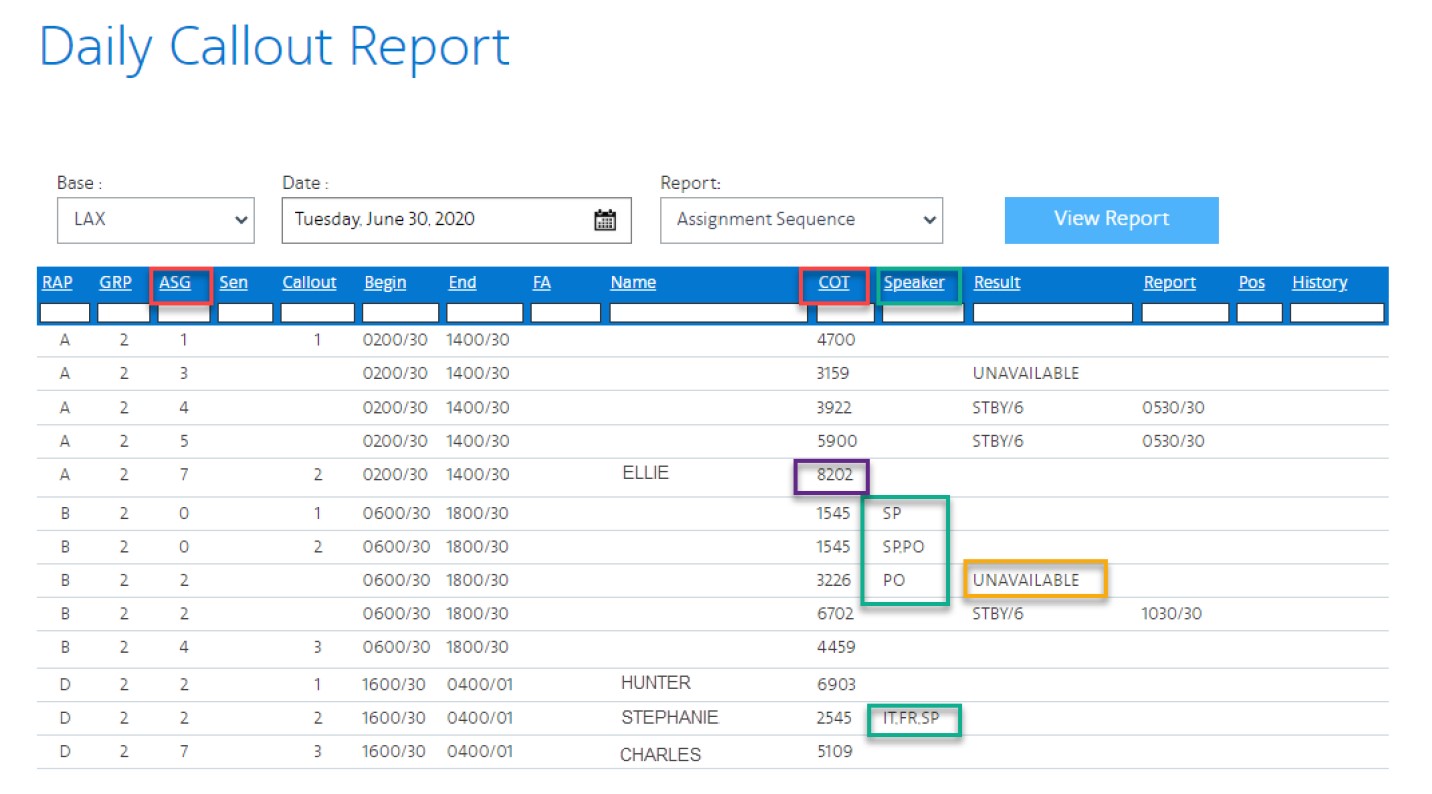
ROTD processes awards/assignments for reserves based on their RAP, grouping, clicks, seniority and legalities.
Awards/assignments are processed based on the following logic for sequences that open 2 hours or greater to departure (3 hours for Co-Terminal). These logic details can also be found on Crew Portal under the Report tab, ROTD-Daily Process (select employee number > additional details > logic details). Below is what you will find:
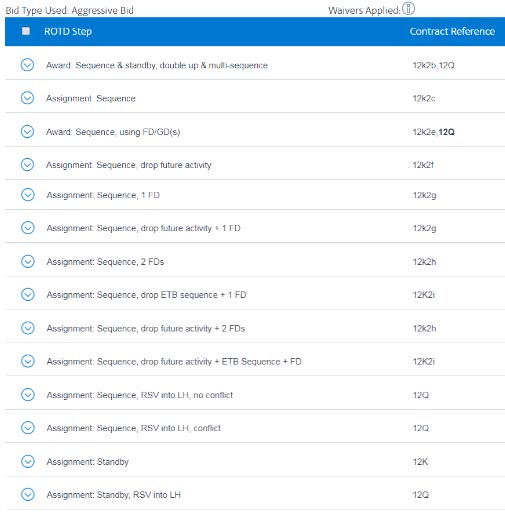
If the contract reference is bold, the reference applies to the logic where you were awarded/assigned.

APFA Headquarters
1004 West Euless Boulevard
Euless, Texas 76040
M-F: 9:00AM - 5:00PM (CT)
Phone: (817) 540-0108
Contract & Scheduling Desk
M-Th: 9:00AM - 5:00PM (CT)
Phone: (817) 540-0108
Live Chat Messaging
Fridays: 9:00AM - 5:00PM (CT)
Currently, no scheduled events...
APFA Headquarters
1004 West Euless Boulevard
Euless, Texas 76040
M-F: 9:00AM - 5:00PM (CT)
Phone: (817) 540-0108
Contract & Scheduling Desk
M-Th: 9:00AM - 5:00PM (CT)
Phone: (817) 540-0108
Live Chat Messaging
Fridays: 9:00AM - 5:00PM (CT)
Currently, no scheduled events...
APFA Headquarters
1004 West Euless Boulevard
Euless, Texas 76040
M-F: 9:00AM - 5:00PM (CT)
Phone: (817) 540-0108
Contract & Scheduling Desk
M-Th: 9:00AM - 5:00PM (CT)
Phone: (817) 540-0108
Live Chat Messaging
Fridays: 9:00AM - 5:00PM (CT)
Currently, no scheduled events...