

1.15.26 – APFA ORD Base Brief – Thursday, January 15, 2026

Thursday, January 15, 2026
In Memory of Shaniqua Hammet
It is with great sadness that we share the news of the passing of our beloved Chicago Flight Attendant, Shaniqua Hammet. Her engaging conversations will be deeply missed. She approached every endeavor with ambition and her kindness will be remembered by everyone who had the pleasure of knowing her. Cards and condolences can be sent to Shaniqua’s mother:
Shirley Crawford Shaw
3991 Parris Bridge Road
Boiling Springs, SC 29316
Funeral
Saturday, January 17 at 2 PM
St. Paul United Methodist Church
3733 Thurgood Marshall Highway
Kingstree, SC 29556
Interment will follow at Greenlawn Cemetery, Kingstree, SC
Employee Assistance Program (EAP)
EAP is a valuable resource. They are there for you!
If you or someone you know is feeling overwhelmed, stressed or just not yourself, American Airlines EAP is available 24/7.
American’s EAP offers completely confidential support for many things life throws your way: mental health, family challenges, financial stress, substance concerns, or just someone to talk to. You don’t have to be in crisis to reach out, and the first sessions are free.
If you or someone you know could use the support, don’t hesitate to connect with EAP 24/7.
833-721-2322 or my.aa.com/eap
EFB Provider Now AT&T
The company has recently changed the cellular provider for our EFBs from T-Mobile to AT&T. Here’s how to update the service provider in your EFB:
1. Open the **Settings** app on your EFB.
2. Select **Cellular**.
3. Click on **Cellular Data**.
4. Make sure **AT&T** is selected under Cellular Data.
5. Ensure that **Allow Cellular Data Switching** is turned on to enable switching.
If you have any questions or are unable to update your settings, please contact the iPhone EFB Help Desk at 800-203-5949 or 817-786-0853.
Critical Period
If you did not have a removal between December 22 and January 3, the banked points you earned during this important period have been uploaded to MyView. Please check to ensure that your banked points have been applied correctly by visiting: Crew Portal > Links > My Information > MyView.
If you see discrepancies, reach out to your Crew Attendance Manage (CAM) at [email protected].
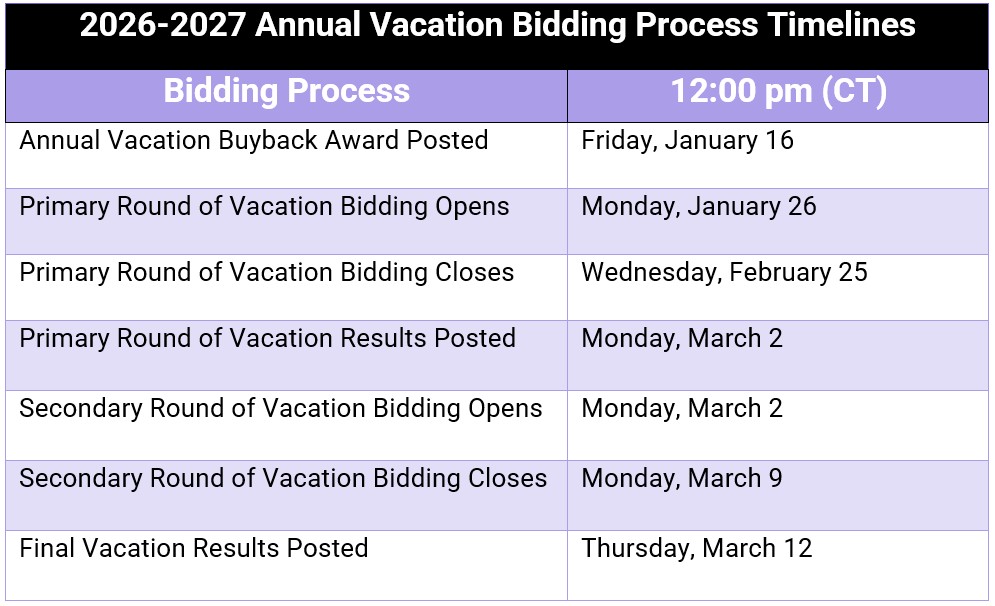
Vacation Bidding
If you have any questions regarding your accrual or the buyback and bidding process, you may email [email protected] or open a ticket on the Support Tab on Crew Portal.
Reserve Acknowledgement
There has been an increase of Reserve Flight Attendants receiving missed trips for not acknowledging their assignments. If you or someone you know is on Reserve, please take a moment to remind them of our obligations when it comes to acknowledging our reserve Assignments.
- Reserve Flight Attendants must acknowledge their ROTA assignment by 2230 (Home Base Time) (or within 1 hour of release from a sequence)
- On RAPs that start 0500 or later, you must check Crew Portal at the commencement of your RAP to see if you have been assigned anything
Missed Trip While on Reserve
While getting a missed trip is never good practice, it happens and has been happening more often with reserve Flight Attendants in recent months. In the case that you are on reserve, and miss an assignment while on RAP, or did not acknowledge properly the day prior. There is a way you can avoid a 2 point occurrence and only 1 point.
- Contact Crew Scheduling once you realize you have gotten the Missed Trip/Failure to Acknowledge to go back on RAP.
- Once back on RAP you may go aggressive in ROTD or wait to be assigned something.
- If you receive another assignment, the TM (2 points) will be removed and changed to a LR (1 point) by the attendance team. Reach out to your CAM if these changes are not made within 48 hours. You must receive another assignment in order for the TM to be changed.
Attendance and Performance Policy

Electronic Communication System (ECS) Updates
You can now use the Electronic Communication System (ECS) to submit your sick notification at any time before your departure if necessary. If you are on sequence, you must call Crew Tracking.
To report sick: Select ECS on your EFB > Contact AA > Report Sick. Please make sure to review the dates you enter. Once you are marked as sick, you will remain out for the trips you have selected.
Safe Travels!
In Solidarity,
Justin Patterson
APFA ORD Base President
ORD Base Number: (773) 645-0809
Cell: (509) 720-0067
[email protected]
Dray Howard
APFA ORD Base Vice President
ORD Base Number: (773) 645-0809
Cell: (630) 215-8410
[email protected]

APFA Headquarters
1004 West Euless Boulevard
Euless, Texas 76040
M-F: 9:00AM - 5:00PM (CT)
Phone: (817) 540-0108
Contract & Scheduling Desk
M-Th: 9:00AM - 5:00PM (CT)
Phone: (817) 540-0108
Live Chat Messaging
Fridays: 9:00AM - 5:00PM (CT)
Currently, no scheduled events...
APFA Headquarters
1004 West Euless Boulevard
Euless, Texas 76040
M-F: 9:00AM - 5:00PM (CT)
Phone: (817) 540-0108
Contract & Scheduling Desk
M-Th: 9:00AM - 5:00PM (CT)
Phone: (817) 540-0108
Live Chat Messaging
Fridays: 9:00AM - 5:00PM (CT)
Currently, no scheduled events...
APFA Headquarters
1004 West Euless Boulevard
Euless, Texas 76040
M-F: 9:00AM - 5:00PM (CT)
Phone: (817) 540-0108
Contract & Scheduling Desk
M-Th: 9:00AM - 5:00PM (CT)
Phone: (817) 540-0108
Live Chat Messaging
Fridays: 9:00AM - 5:00PM (CT)
Currently, no scheduled events...