

Legalities
FAR Illegal vs Contractually Illegal
FAR Illegal
A FAR Illegality on your schedule occurs whenever you are scheduled to fly two sequences back-to-back, and the first sequence is delayed arriving back into base giving you less than the FAR required rest between the two sequences.
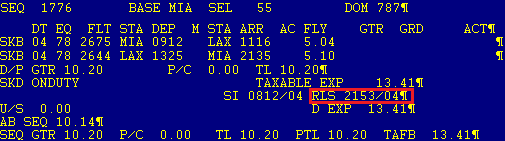


Contractually Illegal
A Contractual Illegality on your schedule occurs whenever you are scheduled to fly two sequences back-to-back, and the first sequence is delayed arriving back into base giving you more than the FAR required rest but less than the CBA contractually required rest between the two sequences.


Home Based Rest Requirements: FAR vs Contractual
| Domestic Lineholders | 10:00 hrs | 11:00 hrs | Yes | No |
| Domestic Reserves | 10:00 hrs | 12:00 hrs | Yes | No |
| NIPD ≤ 14:00 hrs | 10:00 hrs | 12:00 hrs | Yes | Yes, to 10:00 hrs |
| NIPD Mid-Range | 10:00 hrs | 12:00 hrs | Yes | Yes, to 10:00 hrs |
| IPD Non-Long Range and Hawaii Over 6:00 hrs | 10:00 hrs | 14:30 hrs | Yes | No |
| IPD Mid-Range | 10:00 hrs | 14:30 hrs | Yes | No |
| IPD Long Range | 10:00 hrs | 36:00 hrs | Yes | No |
| IPD Extended Long Range | 24:00 hrs | 48:00 hrs | Yes | No |
To see what your Home Base Rest Times with the Scheduled Buffer Times check out the Buffers Chart.
On-Duty Limitations
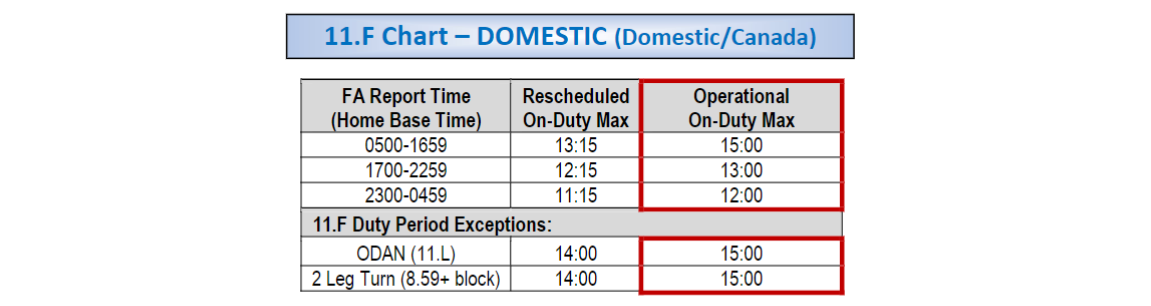
11.F Chart – DOMESTIC (Domestic/Canada)
| 0500-1659 | 13:15 | 15:00 |
| 1700-2259 | 12:15 | 13:00 |
| 2300-0459 | 11:15 | 12:00 |
11.F Chart – DOMESTIC Duty Period Exceptions
| ODAN (11.L) | 14:00 | 15:00 |
| 2 Leg Turn (*8:59+ block) | 14:00 | 15:00 |
11.F Chart – DOMESTIC (Domestic/Canada)
| 0500-1659 | 13:15 | 15:00 |
| 1700-2259 | 12:15 | 13:00 |
| 2300-0459 | 11:15 | 12:00 |
11.F Chart – DOMESTIC Duty Period Exceptions
| ODAN (11.L) | 14:00 | 15:00 |
| 2 Leg Turn (*8:59+ block) | 14:00 | 15:00 |
14.D Chart – INTERNATIONAL (Mexico/Hawaii/NIPD/Mid-Range/IPD)
| NIPD ODAN: 11.L | 14:00 | 15:00 | N/A | Each segment shall contain no more than 2:30hr block |
| Non-Long Range (NR) | 14:00 | 16:00 | 12:00 | A duty period may include any mix of international and domestic segments |
| Mid-Range (MR) | 15:00 | 17:00 | 12:00 | A duty period may include either one (1) Domestic segment and one (1) IPD segment, or a one-day turn (2 NIPDs). |
| Long Range (LR) | 16:00 | 18:00 | 14:15 | A duty period may include (1) IPD segment (only) |
| Extended Long Range (XL) | Flt Time plus Sign in / Debrief Max 20:00 | Original scheduled duty plus 3:00 | N/A | A duty period may include one (1) IPD segment (only) |
Double-Up On-Duty Limitations
| Flying to Training | 16:00 hours | N/A |
| Training to Domestic Duty Period | 14:00 hours | 15:00 hours |
| Training to NIPD/IPD Duty Period | 14:00 hours | 16:00 hours |
| Domestic Duty Period to Domestic Duty Period | 14:00 hours | 15:00 hours |
| Domestic/NIPD/IPD Duty Period to NIPD/IPD Duty Period | 14:00 hours | 16:00 hours |
| NIPD/IPD Duty Period to Domestic/NIPD/IPD Duty Period | 14:00 hours | 16:00 hours |
A 30 minute buffer is required from the release of Sequence #1 to the report of Sequence #2 to scheduled a double-up. However, the buffer does not apply once sequence #1 blocks in.
When Do I Go Illegal?
The segment(s) within a duty period determine if the duty day legalities will fall under Domestic or International for that duty period, not the sequence header. International duty periods will be labeled with one of the following: NR, MR, LR, XL.
As an example, if you have a mixed sequence of NIPD and Domestic flying and there are no NIPD segments in the duty period you are calculating, you will refer to the domestic duty day legalities.
How To Calculate Your Legalities in Actual Operations


Your duty period is based on the scheduled flying within that duty period.
Duty period labels on an HI3 are NR, MR, LR, and XL for International. You will reference the CBA 14.D chart for all duty day legalities to determine if your assignments are legal, your max scheduled duty day, and your actual max duty day in operations. To calculate when you go illegal you will use your standby report time.
Standby Duty Limitations
Domestic/Canada Standby Duty Day Legalities
If your sequence is international, refer to the International Standby Duty Day Legalities Chart (CBA 14.D). The flying within the duty period determines if it is considered an INT or DOM duty period, not the sequence header.
Per CBA 11.G, your standby domestic duty-day maximums are in accordance with the chart in 11.F.
ESTABLISHING the SCHEDULED/RESCHEDULED/OPERATIONAL MAX Duty Day:
- Scheduled Maximum: To determine if you are legal to be assigned the sequence, refer to the 11.F chart using the standby report time.
- Rescheduled/Operational Maximum: Once assigned a legal sequence, to determine your rescheduled and operational on-duty maximum legalities refer to the 11.F chart using the standby report time.
CALCULATING ACTUAL DUTY DAY LEGALITIES: The calculation to determine duty day clock begins at your standby report time. To determine when you will go illegal during actual operations you use your standby report time.
How to Calculate Your Domestic/Canada Legality
When Scheduling assigns a sequence while you are on Standby, you can use this chart from CBA 11.F to ensure that the assignment is legal: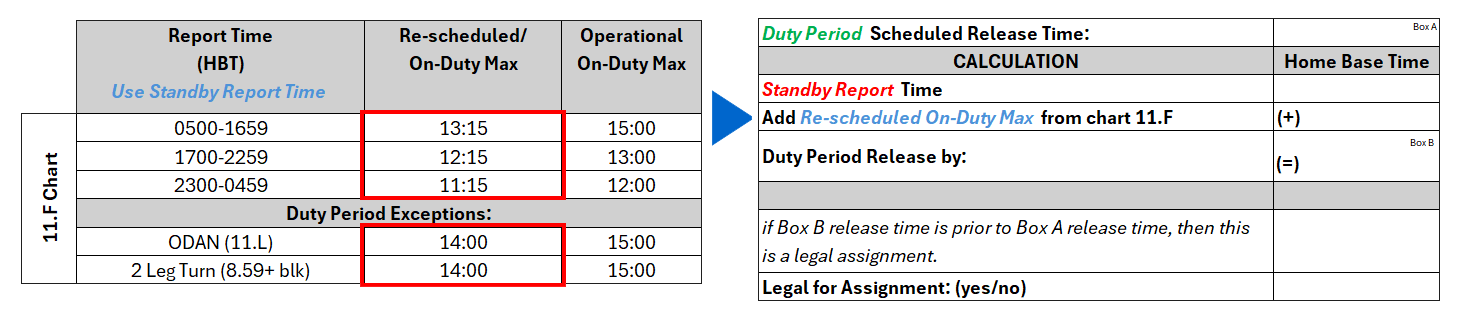
Although the assignment may have been legal at the time you received it while on Standby, further delays, etc. may affect your legalities based on Operational On-Duty Max.
If you are concerned about your legalities because of delays, etc. after you were assigned a sequence while on Standby, use the Operational On-Duty Max from CBA 11.F and the calculator below:

The Three Exceptions
11.G Requires that standby reserve duty limitations are calculated based on the report time of the standby shift. There are three exceptions to these duty limitations.
International Standby Duty Day Legalities (Mexico/Hawaii/NIPD/Mid-Range/IPD)
Your duty period is based on the scheduled flying within that duty period.
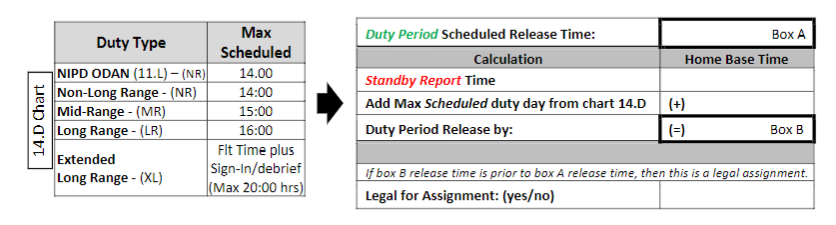
Duty period labels on an HI3 are NR, MR, LR, and XL for International. You will reference the CBA 14.D chart for all duty day legalities to determine if your assignments are legal, your max scheduled duty day, and your actual max duty day in operations. To calculate when you go illegal you will use your standby report time.
How to Calculate Your International Standby Duty Day Legality


Double-Ups
What is a Double-Up?
A Double-Up consists of two sequences within the same duty day with a minimum of 30 minutes between the release time of the first sequence and the report time of the second sequence (CBA 2.N).
Double-Up Duty Rules
- Unless you set a waiver, PBS will not award you a double up (Until PBS, lines will not be built with double up sequences)
- If you choose to double up, you cannot be scheduled to exceed FARs (Federal Aviation Regulation Legalities) (e.g., 24 in 7)
- When picking up a second sequence to be a double-up the combination of duty time between your first and second trip sequences, including the 30-minute minimum buffer between the release from sequence # 1 to the report of sequence # 2, cannot exceed 14 hours.
Example of a legal double-up: On the last day of your first trip, you report at 0600. Your release from duty is at 1000. You need a minimum buffer time of 30 minutes starting at 1000. Trip number 2 (the one you want to double up) has a report time of 1130 and a release time at 1800. For purposes of calculating your duty day, you have to count from 0600 to 1800. In this case, it’s 12:00 hours. Since the duty day maximum is 14:00 hours, it’s a legal double up.
Example of an illegal double-up: The last day of your first trip has a report time of 0600 and a release at 1200. The report time of the trip you want to double up is at 1400 with a release of 2100. For purposes of calculating your duty day, you have to count from 0600 to 2100. In this case it’s 15:00 hours – which exceeds the 14:00 duty day maximum – therefore making it an illegal double up.
Voluntary Extension of Flight Duty Limitations (VE)
What Does It Mean to Waive My Flight Duty Limitations?
When the combination of a delayed departure time and the scheduled flight time(s) projects the Flight Attendant’s duty to exceed the maximum duty limitations. Crew Schedule may offer, and a Flight Attendant may voluntarily agree to, but is not required to continue working beyond their contractual obligation.
Once a Flight Attendant has agreed to extend, the company nor the Flight Attendant can rescind.
The flight can operate with minimum crew if some of the crew chooses not to fly.
A Flight Attendant who volunteers to exceed the maximum duty limitations and, as a result, subsequently becomes illegal for their next trip assignments will be eligible for pay protection under the rules in effect at the time of the Voluntary Duty Waiver.
VE for Domestic Duty Periods
VE for Non-Long Range Duty Periods
VE for Long-Range Duty Periods
VE for Mid-Range Duty Periods
VE for Double-Up Duty Periods
VE for ODANs
- When a Flight Attendant voluntarily agrees to remain on duty beyond the maximum flight duty limits as specified in Chart 11.F up to a maximum of four (4) hours.
- When a Flight Attendant voluntarily agrees to continue working, they shall receive 200% pay and 100% credit when remaining on duty for up to three (3) hours past the on-duty maximum. If the extension is more than three (3) hours, up to a maximum of four (4) hours, they shall receive 300% pay and 100% credit instead of the 200% pay and 100% credit for the duty period.
-
VE pay is the greater of:call out pay, flight time or duty rig.
- Once a Flight Attendant has volunteered to exceed the maximum duty limitations, they will receive 200% pay and 100% credit even if the duty limitations are not exceeded. In such circumstances, the rest provisions contained in Paragraphs I and J, will apply at the end of the extended duty period.
Volunary Extension in ECS
With ECS Flight attendants may express interested in Voluntary Extension as well as accept or reject Voluntary Extension offers from Crew Tracking. There are three (3) options in ECS related to Voluntary Extension.
- You may preemptively express interest in VE through the Contact AA option in ECS. This is not a binding agreement to VE, only notifying Tracking that you are interested in VE should it be offered.
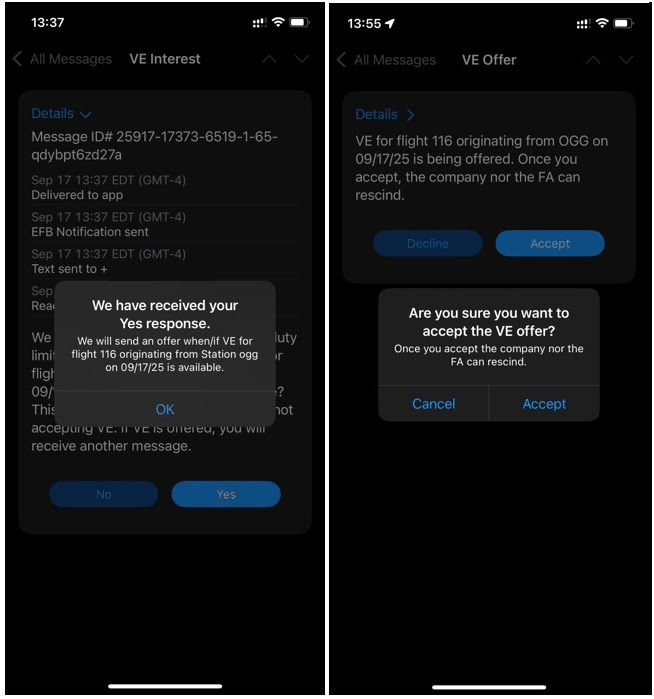
- When you are not yet projected to exceed your duty day, Crew Tracking may reach out through ECS to gauge if you are interested should VE be offered. Crew Tracking may use this information when determining coverage, but it is not an official offer of VE nor is it a binding agreement
- When you are projected to exceed your actual operations duty limit, Crew Tracking may offer VE through ECS. You will be able to accept or decline the VE offer in ECS. Once the offer is accepted, it cannot be rescinded.
I. Expressing interest in Voluntary Extension with ECS
Follow these 4 Steps to express interest in Voluntary Extension.
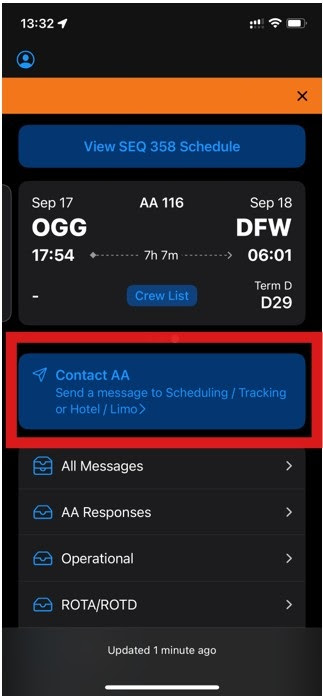
Step 1 - Click the "Contact AA" option from your ECS landing page
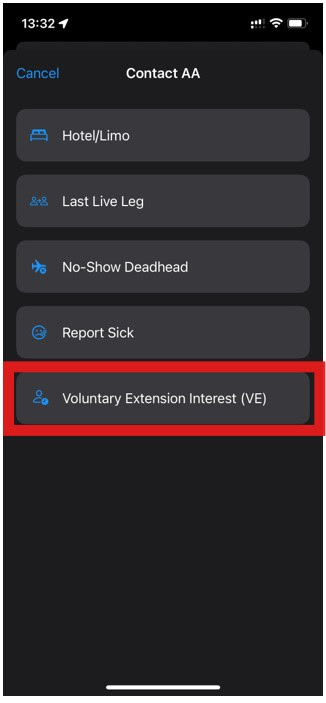
Step 2 - Press option "Voluntary Extension Interest (VE)"
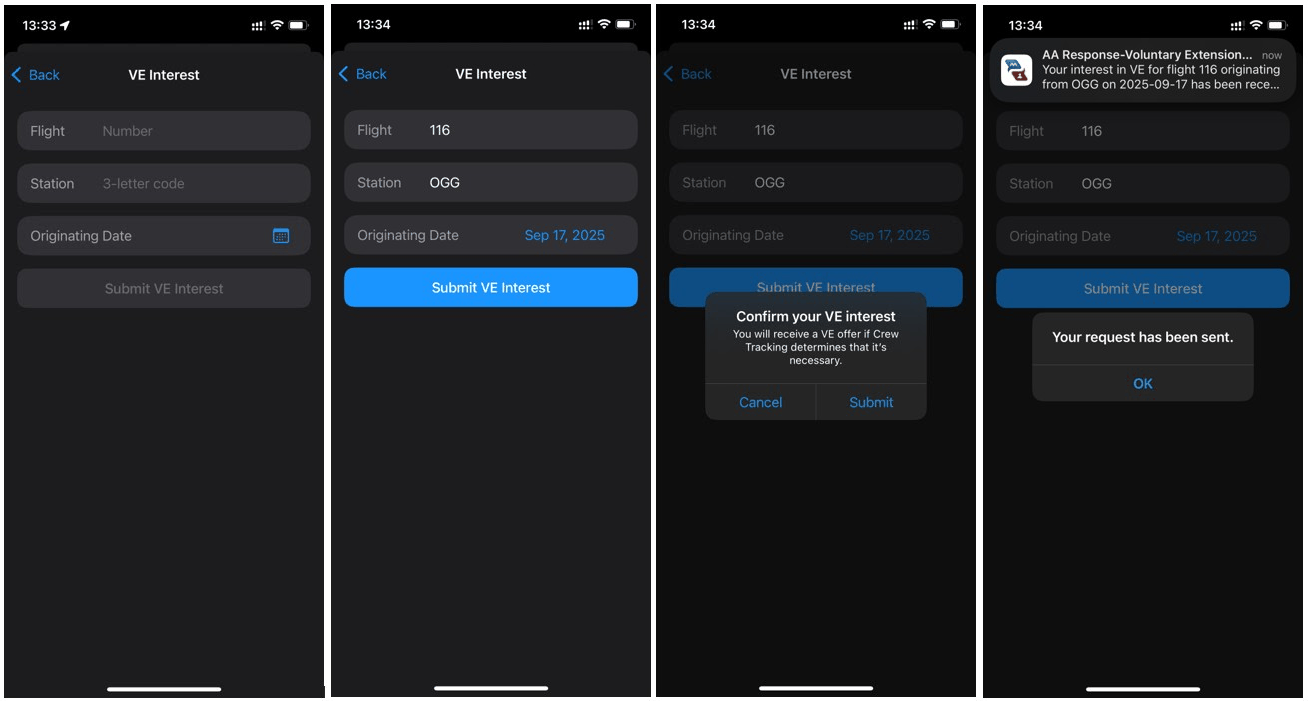
Step 3 - Enter details of the flight that may cause you to exceed your duty limit.
- Flight number
- Origination station
- Scheduled departure date
Step 4 - After your submission is received, you can find your message in the All Messages or the AA Responses inbox.
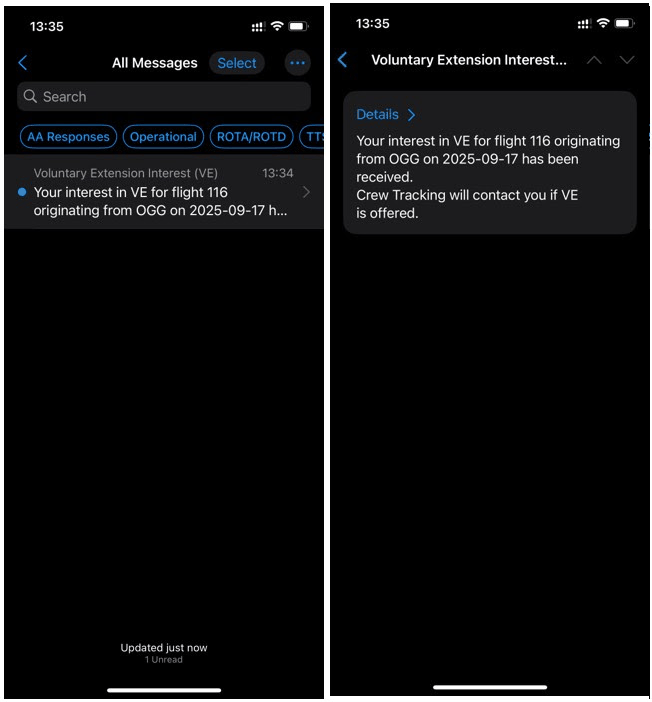
The above steps will record your interest in VE to Crew Tracking so they will know you are interested should they offer VE.
You will still receive a VE offer and have the opportunity to accept or decline.
II. Gauging interest in Voluntary Extension (from Crew Tracking) with ECS
When Crew Tracking reaches out to gauge if you are interested in VE should they offer it, you will receive a message to your All Messages and Operational inbox.
NOTES:
- If you have already expressed interest, you will not receive this message.
- Crew Tracking will not gauge interest if you are already projected to exceed your duty day; if you are already projected to exceed, you will either be given an offer to VE or Tracking will work to repair your sequence.
Step 1 - You will receive a message from Crew Tracking gauging your interest in VE based on projections.
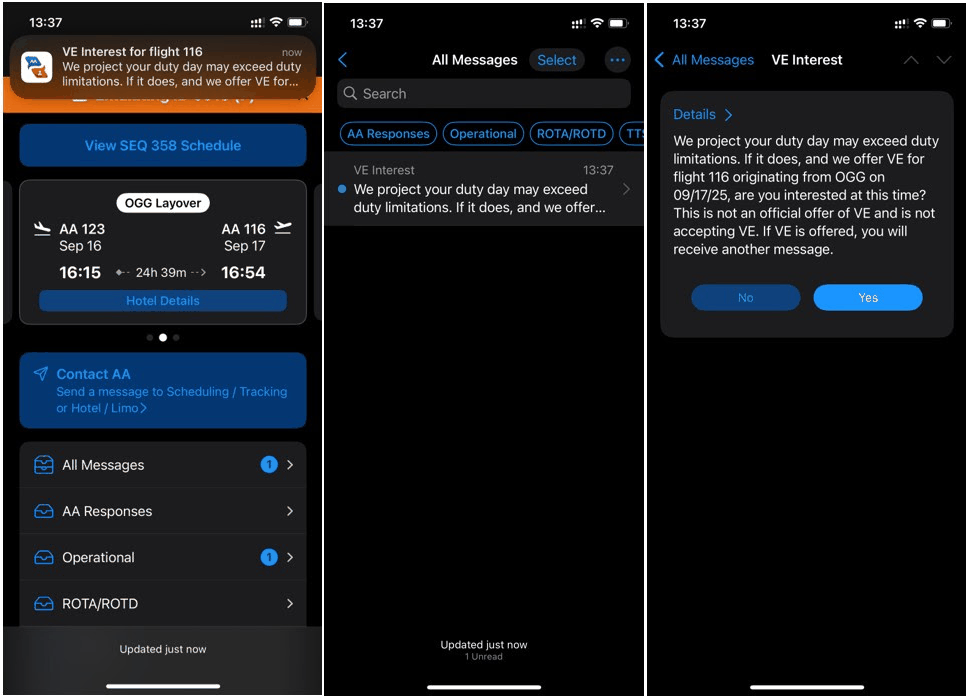
Step 2 - Here you will be able to select Yes if you are interested or No if you are not.
Again, this is not an official nor binding offer of VE, only gauging interest for coverage purposes.
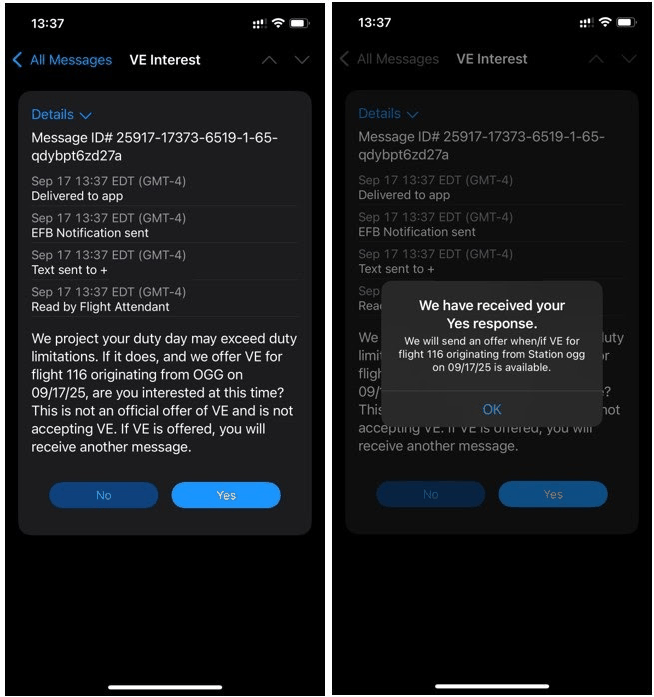
Step 3 - After submitting, your record of Yes or No will update on the message.
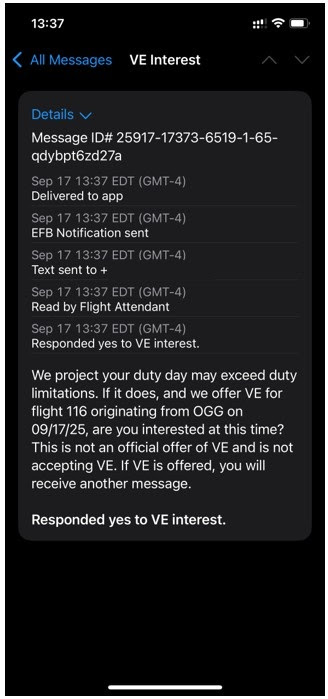
Should VE be offered, you will receive a separate message from Crew Tracking.
III. When Crew Tracking offers Voluntary Extension through ECS
Step 1 - You will receive a message to your All Messages and Operational inbox.
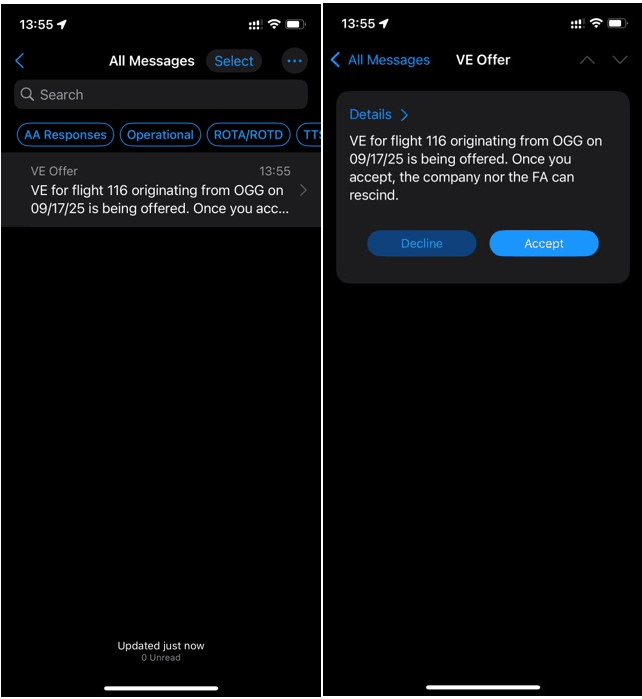
Step 2 - You will be able to Accept or Decline the VE offer. You will receive a confirmation when you hit either option prior to submitting.
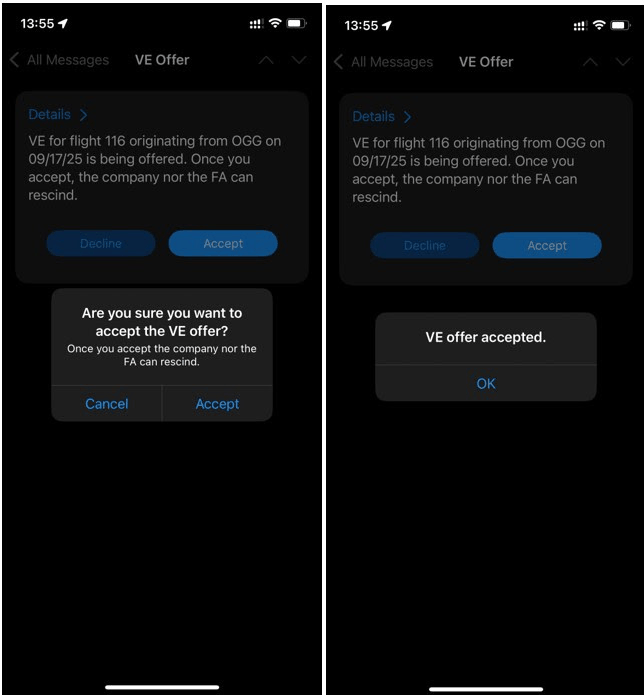
Step 3 - Once accepted, the offer may not be rescinded. The message will update with a record of your response.

APFA Headquarters
1004 West Euless Boulevard
Euless, Texas 76040
M-F: 9:00AM - 5:00PM (CT)
Phone: (817) 540-0108
Contract & Scheduling Desk
M-Th: 9:00AM - 5:00PM (CT)
Phone: (817) 540-0108
Live Chat Messaging
Fridays: 9:00AM - 5:00PM (CT)
Currently, no scheduled events...