

4.17.26 – ROTA/ROTD Acknowledgement Receipts in ECS

ROTA/ROTD Acknowledgement Receipts in ECS
Friday, April 17, 2026
We are hearing reports about reserve acknowledgement issues. Some Reserve Flight Attendants are acknowledging assignments in Crew Portal but are given missed trips when the acknowledgement is not accurately recorded.
When you acknowledge a reserve assignment in Crew Portal, a receipt of the acknowledgement is recorded in ECS. We want to provide a reminder of how to view an acknowledgement receipt for both ROTA and ROTD assignments, as well as general reserve acknowledgement reminders.
Viewing an acknowledgement receipt for a Future (ROTA) assignment
Within ECS, follow these steps (as also shown in the screenshot below):
- Click on ROTA/ROTD messages
- Click on the relevant notification of the Future (ROTA) assignment
- Click on Details
- If acknowledgement is successfully recorded, a time and date stamp will be present with the note: “Acknowledged by Flight Attendant”
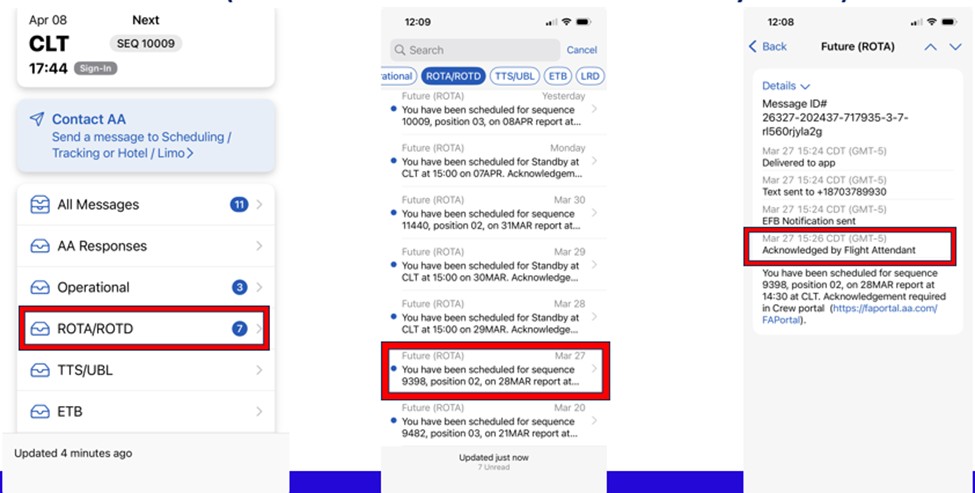
Viewing an acknowledgement receipt for a Daily (ROTD) assignment
Within ECS, follow these steps (as also shown in the screenshot below):
- Click on ROTA/ROTD messages
- Click on the relevant notification of the Daily (ROTD) assignment
- Click on Details
- If acknowledgement is successfully recorded, a time and date stamp will be present with the note: “Acknowledged by Flight Attendant”
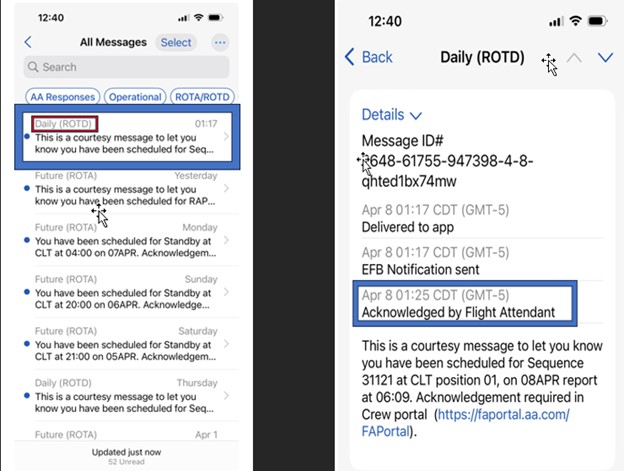
If you acknowledge your ROTA or ROTD assignment and do not see the acknowledgement receipt in ECS, call crew scheduling to have them verify that your acknowledgement has been received. If the scheduler does not see the acknowledgement, they should clear their cache and recheck before issuing a Missed Trip (TM).
If you have been given a missed trip even though you acknowledged your reserve assignment on Crew Portal, please reach out to your APFA base reps for assistance.
Additional Reserve Acknowledgement Reminders
ROTA:
Once ROTA runs for the following day, you are required to electronically acknowledge sequence and standby assignments by 2230 Home Base Time (HBT), using the acknowledgment button on Crew Portal. The only exception is if you are on a sequence or standby during that timeframe. If on a sequence or standby, you must acknowledge within an hour of release from the sequence or standby.
The company has been issuing missed trips if ROTA assignments are not acknowledged by 2230 HBT. As a reminder, if ROTA assigns you a RAP you do not need to acknowledge the RAP.
ROTD:
If ROTA runs and you are assigned a RAP, any subsequent sequence or standby assignments will be made through ROTD.
If you are given a RAP, you are contractually required to check Crew Portal for an assignment at the start of your RAP. If you have an assignment at the start of your RAP, you are contractually required to electronically acknowledge on Crew Portal.
The only exception is for RAPs that start before 0500. If you are on a RAP that starts before 0500, you are not required to check Crew Portal for an assignment at the start of your RAP. Any ROTD assignments made for Reserves on a RAP that starts before 0500 require a phone call from the crew scheduling.
Once your RAP starts, regardless of which RAP you are on, crew scheduling is required to make a phone call to notify you of a ROTD assignment.
The only change to that requirement was implemented on October 1st: if you electronically acknowledge a ROTD assignment in Crew Portal, regardless of whether the assignment was made before or during your RAP, the company is not required to call to notify you of the assignment.
Information regarding ROTA and ROTD as well as other Reserve contractual provisions can be found in CBA Section 12.
The APFA website has easy to understand Reserve information: APFA.org/reserve-resources/
In Solidarity,
Jeff Petersen
APFA National Contract Chair
[email protected]
Marti McMillan
APFA National Scheduling Chair
[email protected]

APFA Headquarters
1004 West Euless Boulevard
Euless, Texas 76040
M-F: 9:00AM - 5:00PM (CT)
Phone: (817) 540-0108
Contract & Scheduling Desk
M-Th: 9:00AM - 5:00PM (CT)
Phone: (817) 540-0108
Live Chat Messaging
Fridays: 9:00AM - 5:00PM (CT)
Currently, no scheduled events...
APFA Headquarters
1004 West Euless Boulevard
Euless, Texas 76040
M-F: 9:00AM - 5:00PM (CT)
Phone: (817) 540-0108
Contract & Scheduling Desk
M-Th: 9:00AM - 5:00PM (CT)
Phone: (817) 540-0108
Live Chat Messaging
Fridays: 9:00AM - 5:00PM (CT)
Currently, no scheduled events...
APFA Headquarters
1004 West Euless Boulevard
Euless, Texas 76040
M-F: 9:00AM - 5:00PM (CT)
Phone: (817) 540-0108
Contract & Scheduling Desk
M-Th: 9:00AM - 5:00PM (CT)
Phone: (817) 540-0108
Live Chat Messaging
Fridays: 9:00AM - 5:00PM (CT)
Currently, no scheduled events...