

Health
Contact Information
Hayley Brewer - Health Chair
[email protected] | Contact Form
Health Rep on Duty: (817) 540-0108 (press 1, then 2) | [email protected]
Contact Information
Hayley Brewer - Health Chair
Health Rep on Duty: (817) 540-0108 (press 1, then 2) | [email protected]
Health and IOD Text Support Line
The APFA Health and IOD Text Support Line is dedicated to supporting you when you need assistance. We are available M-F during business hours.
Send a message with your name, base, and employee number. One of our Health or IOD Representatives will contact you.
Health Hotlines
5.27.26 – APFA Health, IOD and Safety Departments DFW Terminal Walk
APFA Health, Injury on Duty (IOD) and Safety & Security representatives will be visiting the DFW terminals on Thursday, May 28 from 12 PM until 2 PM. During the terminal walk, representatives will be available to connect directly with Flight Attendants
3.17.26 – FMLA Recertification
Beginning February 1st, 2025, the company changed their Intermittent FMLA recertification process to require updated medical support every six months. With this change, we’ve seen a recurrence of Flight Attendants missing requests for updated medical support
2.20.26 – Spending Account Deadlines
We are approaching the deadline to submit claims for our spending accounts: Health Care Flexible Spending Account, Limited Purpose Flexible Spending Account, Dependent Care Flexible Spending Account, Health Reimbursement Account, and Retiree Health Reimbursement Account
2.12.26 – Reminders: Intermittent FMLA and Calling in Well
Calling in Well (CIW) for intermittent FMLA allows you to fly over the footprint of a trip for which you have called in sick. You must have an approved intermittent FMLA leave on file with the Absence and Return Center (ARC). You must have FMLA days available.
2.07.26 – Review Your 2026 Benefits Elections
As we enter the second month of 2026, I want to encourage everyone to take a moment to carefully review your pay stubs and compare them with your 2026 benefits elections. Go to: My.AA.com > Benefits Service Center > Health & Insurance > Your Current Coverage
2.05.26 – FMLA: 33 Years of Access to Worker Health Protections
Today, we commemorate the 33rd anniversary of the passage of FMLA. This landmark law has protected Workers’ rights to take time off for family and medical reasons without risking their jobs or health insurance.
2.04.26 – Injury on Duty (IOD) Information and Support
The American Airlines Workers’ Compensation page has been updated to enhance navigation and access to essential resources, all in one location specifically for Flight Attendants. Post-Maximum Medical Improvement (MMI) recode link is now available on the page.
1.22.26 – StayWell Rx
Have you been diagnosed with diabetes, asthma, or hypertension/high blood pressure? Do you take medication(s) to manage it? If so, you can fill your prescription(s) for free through StayWell Rx. StayWell Rx is a prescription discount program through CVS Caremark.
APFA Health, Injury on Duty (IOD) and Safety & Security representatives will be visiting the DFW terminals on Thursday, May 28 from 12 PM until 2 PM. During the terminal walk, representatives will be available to connect directly with Flight Attendants
Beginning February 1st, 2025, the company changed their Intermittent FMLA recertification process to require updated medical support every six months. With this change, we’ve seen a recurrence of Flight Attendants missing requests for updated medical support
We are approaching the deadline to submit claims for our spending accounts: Health Care Flexible Spending Account, Limited Purpose Flexible Spending Account, Dependent Care Flexible Spending Account, Health Reimbursement Account, and Retiree Health Reimbursement Account
Benefits
APFA Supplemental Benefits
Colonial Life Supplemental Benefits
If you carry any supplemental benefits sponsored by APFA, we have a website dedicated to answering your questions. Learn more about your policies, file claims, or contact a representative who can assist by clicking the button below to visit apfaservice.com
| Plan | Coverage* |
|---|---|
| Group Accident Insurance | Group Accident Insurance helps pay costs that arise from covered accidents such as fractures, dislocations and lacerations. This plan provides On and Off Job coverage. |
| Group Critical Illness Insurance | Group Critical Illness Insurance helps pay the expected and unexpected expenses that arise from diagnosis of a covered critical illness such as cancer (internal or invasive), heart attack, stroke, end-stage renal failure or a major organ transplant. |
| Group Hospital Confinement Insurance | Group Hospital Indemnity Insurance helps pay the costs associated with a hospital stay including benefits for hospital confinement, hospital admission, hospital intensive care and intermediate intensive care step- down unit. |
| Group Disability Insurance | Group Disability Insurance helps protect your income in the event that you are unable to work. On and off the job coverage is available. (Maternity Coverage) |
| Group Whole Life Insurance | Group Whole Life Insurance helps provide financial security for your family members. Whole life insurance offers fixed premiums and guaranteed death benefits. The policy builds cash value on a tax-deferred basis. |
| Group Cancer Insurance | Group Cancer Insurance helps cover medical and non-medical expenses related to the diagnosis, treatment and your recovery. |
* This is a brief product overview only. These plans have limitations and exclusions that may affect benefits payable. Refer to the plans for complete details, limitations, and exclusions.
AA Benefits
American Airlines Benefit Resource
Benefits Service Center
Phone: 888-860-6178
Health & Benefits
If you’re looking for information regarding your medical coverage, dental, vision, prescriptions, or spending accounts visit my.aa.com.
StayWell Rx
With StayWell Rx you can save big on eligible high blood pressure, diabetes and asthma medications, as well as supplies. Participants receive their 90-day supplies of generic medications for free and brand name medications for only $30! To see if you are eligible and to see a list of eligible medications visit my.aa.com/staywell-rx.
| Medical Coverage Contact Directory | |
|---|---|
| Medical |
Blue Cross Blue Shield: 833-346-3929 (833-FIND-WAY) Baylor Scott & White Quality Alliance (BSWQA): 800-784-5473 |
| Dental | MetLife: 866-838-1072 |
| Vision | EyeMed: 844-714-5678 |
|
Life Insurance, Accident and Disability Insurance |
New York Life: 800-238-2125 MetLife: 800-638-6420 MetLife Disability: 888-533-6287 Post-Pregnancy Disability Insurance: 888-533-6287 AA Added Benefits (voluntary offerings) 855-550-0706 MetLife Legal Plan Liberty Mutual, Farmers GroupSelect and Travelers Home & Auto Lifelock Identity Theft Protection Nationwide Veterinary Pet Insurance (VPI) The Hartford Group Accident Insurance The Hartford Critical Illness Insurance Carrington Discount Dental Plan The Hartford Hospital Indemnity |
| HMO (California) |
Kaiser Foundation Health Plan, California: 800-464-4000 Triple-S: 800-981-3241 |
| Prescription Drug | CVS Caremark: 844-758-0767 |
| Health Savings Accounts (HSA), Flexible Spending Accounts (FSA), and Health Reimbursement Arrangements (HRA): | Fidelity: 800-354-3412 |
| Maternity Post-Pregnancy | Post-Pregnancy Disability Insurance: 888-533-6287 |
| Employee Assistance Program (EAP) | AETNA: 833-721-2322 |
| Virtual Doctor Visits | Doctor On Demand: 800-997-6196 |
| Surgery Support | Lantern: 833-709-2445 |
|
AA 401(K) Service Center at Fidelity Investments |
401(k) Service Center at Fidelity: 800-354-3412 Fidelity One-on-One Guidance: 800-603-4015 |
| AA Flight Services Contacts | FA Service Center: 800-847-2739 |
| AA Added Benefits (Voluntary Offerings) | 855-550-0706 |
Disability
AA Disability Information
How to File for Disability
How do I file for short term or long-term disability? Learn how to file for short-term or long-term disability
How to File a Claim
1. Gather your treatment dates, the dates you last worked and were last paid, and your physician’s and supervisor’s contact information.
2. Then call MetLife at 888-533-6287 and select option 2.
Leaves of Absence
Requesting Leave
Should you need to take a medical leave, FMLA, leave for a family member, or maternity leave, AbsenceTracker is the place to start. This quick guide will walk you through how to create a case and what to expect. Learn About Leaves & Returns
Watch a walkthrough on requesting a leave in Absence Tracker
Unpaid Medical Leave
In the first 12 months of unpaid medical leave, you will pay your current benefit contributions. The company policy is, if you are out longer than 12 months on an unpaid status, you will transition to COBRA. Consolidated Omnibus Budget Reconciliation Act (COBRA) allows you to continue group health benefits. Learn More Here
Personal, Voluntary, Educational, Medical, Family, Military, and Maternity / Paternity / Adoption
For information about contractual leaves of absence, such as Personal Leave, Voluntary Leave, Educational Leave, Medical Leave, Family Leave, Maternity/Paternity/Adoption Leave, and Military Leave view Section 25 of the CBA.
AbsenceTracker
You can find the following items in AbsenceTracker (Jetnet > Resources > Team member services > Leaves and returns)
- Check status of sick leave request
- Health Care Provider Certification Form (HCPC/FMLA Form)
- Return to work form
- Check status of FMLA request
In accordance with CBA Section 9.B.2., A Flight Attendant who is unable to report for duty for twenty-one (21) or more consecutive days following the origination of a sick call will be required to notify her/his Crew Manager. The Company may require a Flight Attendant who is unable to report for duty for twenty-one (21) or more consecutive days to present medical documentation.
With the implementation of AbsenceTracker, the Company has utilized the ability to auto-designate FMLA while on a medical leave of absence. Your FMLA will run concurrent with any medical leave(s) that are administratively and medically eligible. Therefore, if the absence extends for twenty-one (21) or more consecutive days, you will be required to create a case within AbsenceTracker. You will be prompted to complete the Health Care Provider Certification Form (HCPC) to substantiate the leave.
If your leave is less than twenty-one (21) days, and you do not wish to utilize FMLA, you are not required to create a case within AbsenceTracker. The absence will be subject to the attendance policy without the usage of FMLA. If your leave is medically substantiated/21+ days and you are not eligible for FMLA, the consecutive absence will be non-punitive.
Below you will find the path to AbsenceTracker and how to request a new case. Once you create a case, you will be notified if you are administratively eligible for FMLA via email, the US Postal Service and in the view attachments button in AbsenceTracker. The FMLA forms will be provided with each method of communication. If you are not administratively eligible for FMLA, the information provided on your HCPC form will be used to designate a Medical Leave.
Once you create a case within AbsenceTracker, it will remain open for fifteen (15) days. Your case does not have to be created on the exact date you are requesting, but it is important to be cognizant of the timeline AbsenceTracker provides you to complete your case. The HCPC form used to designate FMLA has a timeline as well. You will have fifteen (15) days from the start date being requested on your completed form to submit your HCPC form. There is a QR code at the bottom of your form that is for your individual case request. It is important to only use the forms provided. Be sure to check your email in case there is additional documentation or clarification needed. You will have ten (10) days to submit the requested information.
When you create a leave request, all documents needed for your case will be included in the “view attachments" link.
The preferable and easiest method for you to submit your HCPC form is by uploading them directly to AbsenceTracker. You can scan the forms directly to your computer or even upload a clear photo.
Path to the AbsenceTracker is through Jetnet > Resources > Team Member Services > Leaves and Returns
Consecutive & Intermittent Medical Leaves
Below is the consecutive leave (MLOA) and intermittent leave checklists. They will provide a high level overview of the necessary steps for navigating both leave types. You can also download the Consecutive Leave checklist here and the Intermittent Leave checklist here.
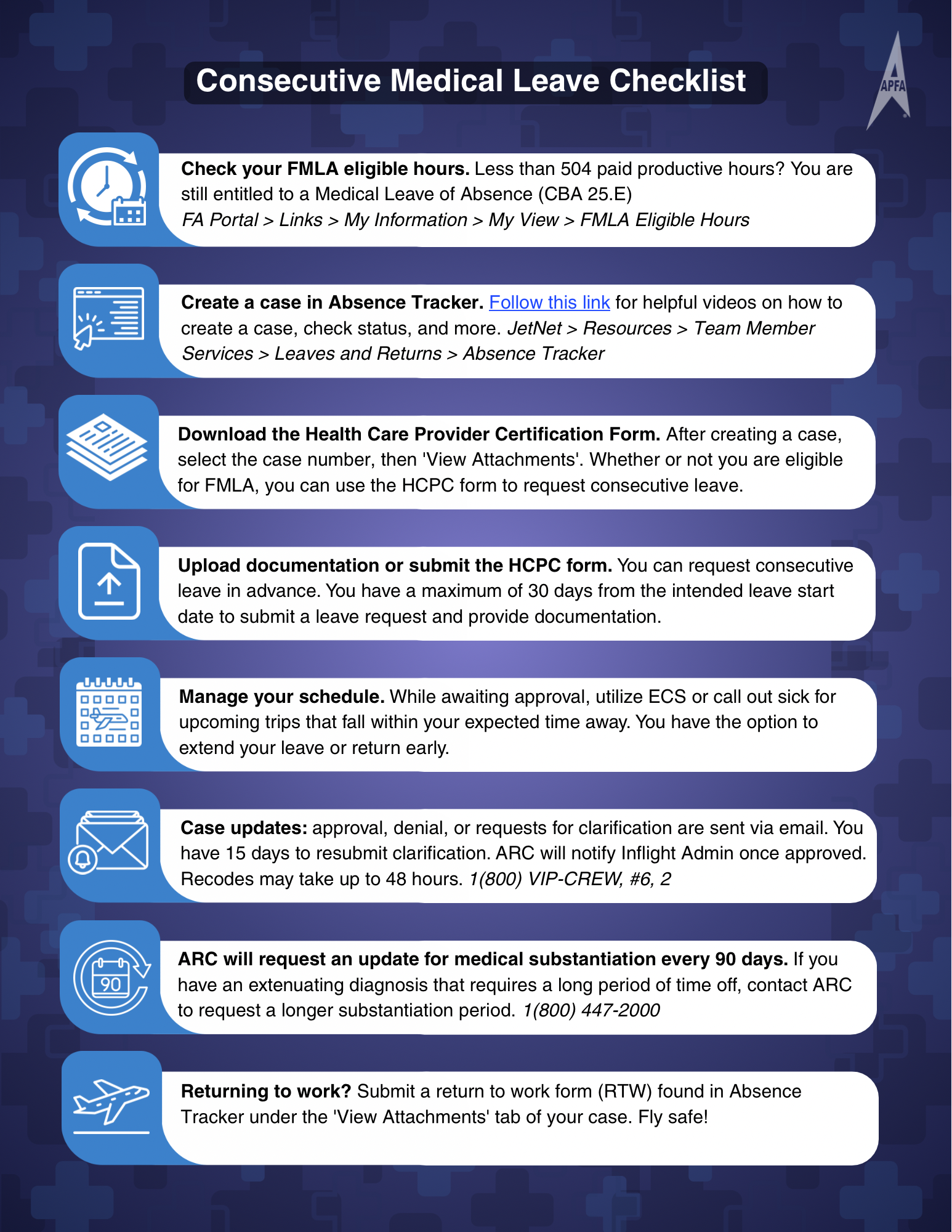
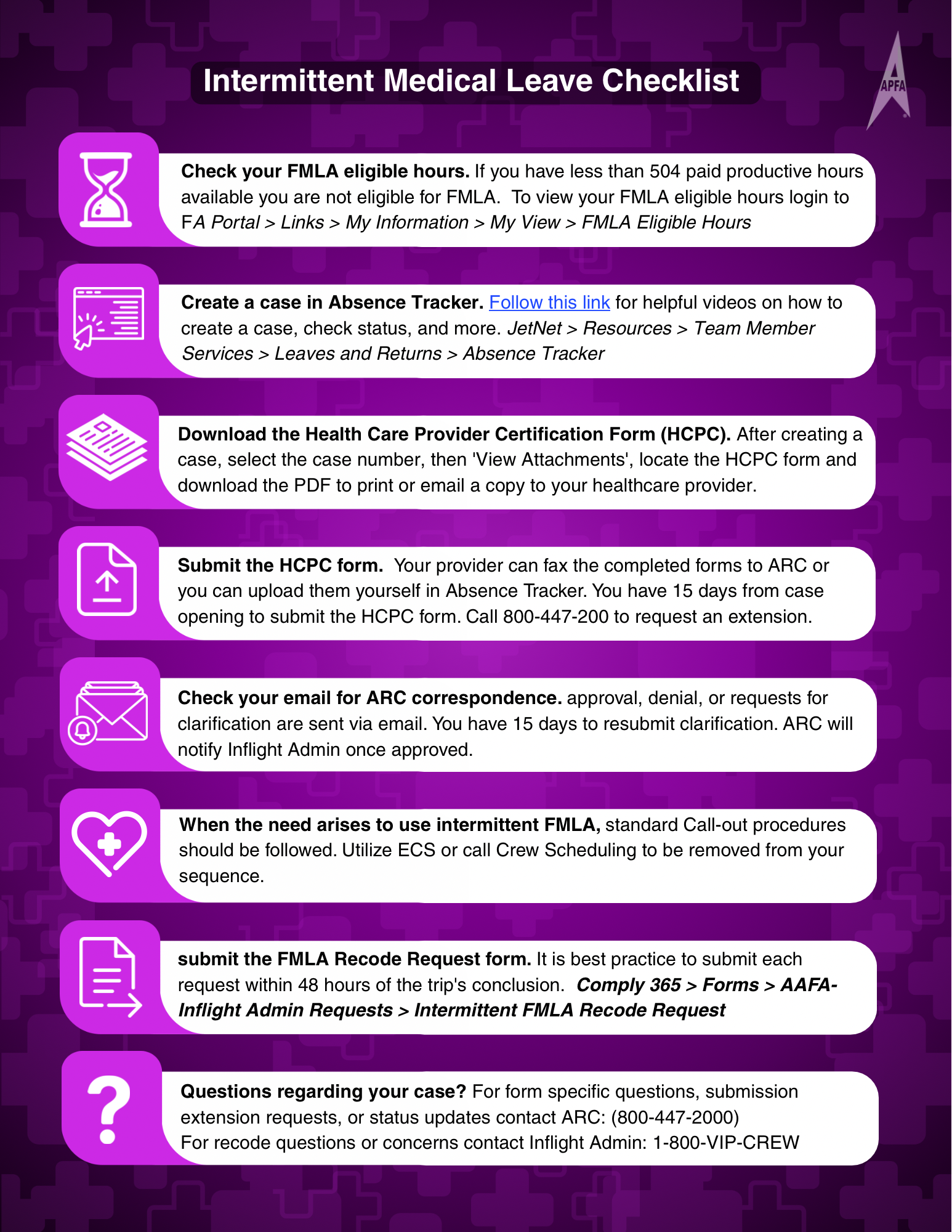
FMLA
The FMLA (Family and Medical Leave Act) allows eligible team members to take time off for their own serious health condition, to care for a covered family member with a serious health condition, for the birth of a child or the placement of a child with the team member for adoption or foster care, and for a “qualifying exigency” when a covered family member is a military member on active duty or has been called to covered active-duty status.
If a team member needs to take a medical leave for their own serious health condition and is either not eligible for FMLA or has exhausted their available FMLA hours, their request will be reviewed under Medical Leave of Absence (MLOA). Go to “My View” via Crew Portal > Links > My Information to check your eligibility.
View the Special Rules for Airline Flight Crew Employees Under FMLA
How to File a Wage and Hour Division Complaint with the DOL
Calling Out Sick for an FMLA Covered Illness
Recoding
How to Recode a Sick Absence
If you report sick for a sequence, standby or reserve day, you must now submit the Intermittent FMLA Recode Request Form on Comply365. You may use the Comply365 on your iPhone EFB or on your personal device by going to aa.comply365.net
Go to Comply365 > Forms > AAFA > FA Admin Requests > Intermittent FMLA Recode Request
Complete the form within 2 days of returning to work from that absence. Best practice to complete the recode request form after reporting sick, inflight admin may deny for timeliness.
Calling In Well
With a valid FMLA designation on file and FMLA days available, you may “call-in-well” to fly prior to your anticipated return to work. However, the time you notify the FASC ultimately determines your ability to Call-In-Well (CIW).
You must submit the Comply365 form (Calling in Well: Intermittent FMLA Recode Request) between 0001 to 1430 HBT the day before you intend to be made available. The deadline to request to CIW is 1430 HBT. If eligible, your request will be processed before 1500 HBT. You are unable to call in well and fly the same day.
By submitting this form, you acknowledge the following:
- The first day of each sequence will remain an Intermittent FMLA absence.
- Calling in well is not applicable for 1-day sequences, ODANS or double-ups.
- If you do not work on the day(s) you've been made well, the absence will revert to FMLA.
FMLA and Flight Service Attendance Policy
Attendance points will not be generated for days covered by FMLA. If a banked point was used to mitigate a point generated by a sick absence, the banked point will be restored overnight after the absence is re-coded as FMLA.
Utilization and Eligibility Hours
You may view your current FMLA utilization and eligibility hours by clicking on MyView, which can be found by going to Crew Portal > Links > My Information.
On Duty Hours are calculated using the following:
- All time from sign-in to debrief for each day of a sequence, including sit time between flights.
- Layover time is not counted.
- Only actual time worked is included - not the greater of schedule or actual.
- 8:00 (eight hours) is credited for each day of training.
- Scheduled time (sign-in to debrief) for each trip removal for AP/UJ (APFA Removals).
- FA on Special Assignment will receive 5 hours.
If you have any questions about anything in MyView, contact the Flight Attendant Service Center.
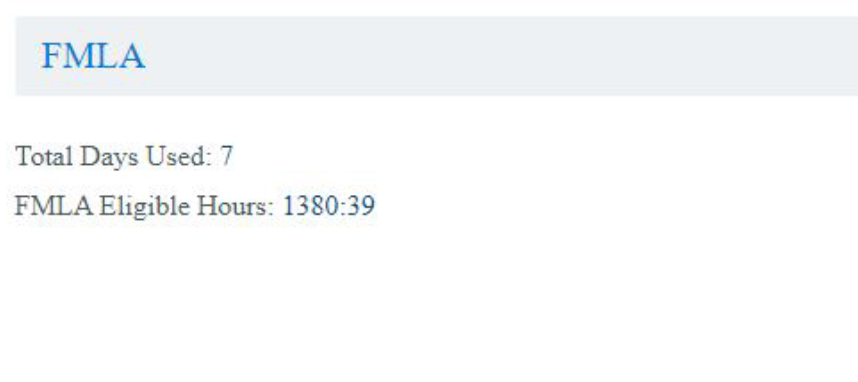
Total Days Used
The number of FMLA days you have used towards the annual allotment of 72 days.
FMLA Eligible Hours
Eligibility hours are calculated in a rolling 12-month period with the current month’s eligibility hours reflecting through the end of the previous month. For example, November 2019 eligibility hours are a sum of November 2018 through the end of contractual October 2019.
Duration & Frequency of FMLA
The duration and frequency of self/caregiver intermittent FMLA leave is only an estimate based on your physician’s recommendation. If the duration of a trip exceeds the duration of your intermittent leave as designated by your physician, your absence can still be recoded as FMLA.
Changes to Your Intermittent FMLA Frequency
If the frequency and/or duration of your episodes significantly change from what was originally designated by your physician, you should visit your physician again to ensure that your FMLA is properly capturing your need for intermittent FMLA. You must be available 15 days or more in a contractual month to be eligible to accrue Sick and Vacation.
When FMLA is Considered Paid or Unpaid
If your FMLA is for yourself your absence will be re-coded as “IS” in FOS to reflect “Self-Intermittent Paid FMLA” for the portion paid from your sick bank. If you do not have enough sick time available in your sick bank, your sick call will be re-coded as “MF” in FOS to reflect “Self-Intermittent Unpaid FMLA” for the unpaid portion from your sick bank.
How Vacation Days are Used for Intermittent FMLA
FMLA for Yourself
If your FMLA is for yourself and you do not have enough sick time available in your sick bank, at your option, you may use vacation and/or filler days scheduled for later in the year for pay purposes. Your absence will be re-coded as “IV” in FOS to reflect “Self-Intermittent FMLA Vacation” for the unpaid portion from your sick bank. Indicate the vacation block to use. (Ex. back of 09FEB21 block)
Check "UNPAID - No Paid Option / Available / Applied" if this absence was for you and:
— You do not have sick time or
— You do not want to apply vacation hours to this absence
In this case, your absence will be recoded Intermittent FMLA, Unpaid (MF).
"Caregiver" FMLA for a Family Member
If your FMLA is “caregiver” for a family member, your vacation and/or filler days will be used, your absence will be re-coded as “IV” in FOS to reflect “Caregiver-Intermittent FMLA Vacation”. You will need to indicate on the recode request form which vacation and/or filler day(s) you want to use.
If your FMLA is “caregiver” for a family member, and you don’t have enough vacation days, your absence will be re-coded as “MF” in FOS to reflect “Caregiver-Intermittent FMLA Unpaid”.
Vacation days in blocks of seven (7) or more consecutive days will be paid and credited at four (4) hours per day at the Flight Attendant’s rate of pay. Vacation days in blocks of less than seven (7) consecutive days will be paid at four (4) hours and credited at three and one-half (3.5) hours per day. Vacation pay and credit shall be based on a Flight Attendant’s longevity at the time the vacation is taken. ( 8.B.1)
*Please note - With the new contract, if your absence is less than 7 days and it is being covered with VC, you will see 3.30hrs P&C on your HI1 until close out. During close out (by 10th of following month) Crew Comp will add an additional 30 minutes per day to bring your total VC pay to 4hrs
| FOS | FMLA Type | Sick Bank Used? | Vacation Used? |
|---|---|---|---|
| IS | Self-Intermittent | Yes | No |
| MF | Self-Intermittent | No Hours Available | No |
| IV | Self-Intermittent | No | Yes |
| IV | Caregiver-Intermittent | No | Yes |
| FM | Caregiver-Intermittent | No | No Days Available |
Maternity
Below you’ll find a Maternity Leave Checklist which provides a high level overview of the necessary steps when navigating your Maternity Leave. Feel free to download the checklist here. Continue below for a printable version of the comprehensive APFA Maternity Guide.
Maternity Checklist

Notify the Company. Congratulations! Notifying the company that you are expecting is the first step in navigating your Maternity Leave. Follow this path to create a case in Absence Tracker. JetNet > Resources > Team Member Services > Leaves and Returns > Absence Tracker > New Case > Pregnancy/Maternity

Upload proof of pregnancy and supporting documents to your case. Once you've created your case, you can select your case number, then 'Add attachments' to upload your proof of pregnancy. You will need to supply a doctor's note with an expected due date.

Confirm approval from ARC. It is important that you monitor your email following your request. This is where you'll be notified of approval, denial, or clarification requests. If clarification or additional information is requested, you will have 15 days to submit clarification.

Request intermittent recodes for absences. Comply 365 > Forms > AAFA-Inflight Admin Requests > Maternity/Paternity Recode Requests. Confirm you have selected intermittent Maternity Sick. For more information regarding maternity recode allowances see the APFA Maternity Guide

Removal from service. If your doctor writes you out prior to birth, you will need to create a new case in Absence Tracker for an 'Employee Health Condition'. You will then upload the doctor's note in "Add Attachments."

Prepare for Baby
• Contact MetLife to initiate your Post Birth Disability Claim: 1-888-533-6287
• The birth of a child is a qualifying Life Event. Be sure to review your insurance options prior to birth to ensure you make the correct selections during the Life Event window.
Baby Has Arrived
• Contact Metlife to report your birth.
• If applicable, submit 10-week extension paperwork
• You have 60 days to make changes to core benefits via Life Event if necessary
Options for Additional Time Off
• If your doctor orders more time away from work due to complications of pregnancy or birth, you can extend your Maternity Medical Leave by uploading documentation into your previous case.
• You also have the option to elect Maternity PLOA via Comply365.
Submit the Return to Work form
You must submit the return-to-work form upon your return-to-work. This form can be found in 'View Attachments' within the respective case in Absence Tracker.
For more detailed information view the APFA Maternity Guide
Metlife: 1-888-533-6287 | [email protected]
Absence & Return Center (ARC): 1-800-447-2000 | [email protected]
Inflight Admin: 1-800-VIP-CREW | [email protected]
Maternity Checklist
-
Notify the Company. Congratulations! Notifying the company that you are expecting is the first step in navigating your Maternity Leave. Follow this path to create a case in Absence Tracker. JetNet > Resources > Team Member Services > Leaves and Returns > Absence Tracker > New Case > Pregnancy/Maternity
-
Upload proof of pregnancy and supporting documents to your case. Once you've created your case, you can select your case number, then 'Add attachments' to upload your proof of pregnancy. You will need to supply a doctor's note with an expected due date.
-
Confirm approval from ARC. It is important that you monitor your email following your request. This is where you'll be notified of approval, denial, or clarification requests. If clarification or additional information is requested, you will have 15 days to submit clarification.
-
Request intermittent recodes for absences. Comply 365 > Forms > AAFA-Inflight Admin Requests > Maternity/Paternity Recode Requests. Confirm you have selected intermittent Maternity Sick. For more information regarding maternity recode allowances see the APFA Maternity Guide
-
Removal from service. If your doctor writes you out prior to birth, you will need to create a new case in Absence Tracker for an 'Employee Health Condition'. You will then upload the doctor's note in "Add Attachments."
-
Notify the Company. Congratulations! Notifying the company that you are expecting is the first step in navigating your Maternity Leave. Follow this path to create a case in Absence Tracker. JetNet > Resources > Team Member Services > Leaves and Returns > Absence Tracker > New Case > Pregnancy/Maternity
-
Upload proof of pregnancy and supporting documents to your case. Once you've created your case, you can select your case number, then 'Add attachments' to upload your proof of pregnancy. You will need to supply a doctor's note with an expected due date.
-
Confirm approval from ARC. It is important that you monitor your email following your request. This is where you'll be notified of approval, denial, or clarification requests. If clarification or additional information is requested, you will have 15 days to submit clarification.
-
Request intermittent recodes for absences. Comply 365 > Forms > AAFA-Inflight Admin Requests > Maternity/Paternity Recode Requests. Confirm you have selected intermittent Maternity Sick. For more information regarding maternity recode allowances see the APFA Maternity Guide
-
Removal from service. If your doctor writes you out prior to birth, you will need to create a new case in Absence Tracker for an 'Employee Health Condition'. You will then upload the doctor's note in "Add Attachments."
You can download the above Maternity Checklist here
and also view a printable version of the comprehensive APFA Maternity Guide here or by clicking the button below.
Getting Started: Information to Know
Online Resources
AA's Maternity Leave Information: Crew Portal.
MetLife’s Post-Delivery STD Plan: New Parent Resources
MetLife: Medical Substantiation Form for Post Pregnancy Short Term Disability
Order a maternity uniform (Optional): Visit the Lands' End Website
Maternity Leave Process
Maternity leaves typically consist of three different portions: Maternity Medical, Maternity Disability, and Maternity/Paternity Personal Leave
Returning To Work
Should you go out on a Medical Leave prior to birth and return to work prior to birth, you will need to submit a RTW form via AbsenceTracker.
Otherwise, your RTW period will be following Maternity Disability period OR Maternity/Paternity Personal Leave of Absence period if you elect to take the PLOA following disability.
Maternity Intermittent Sick
Pregnancy/Maternity case must be approved prior to submitting recode request. You can view your Maternity Leave status in AbsenceTracker. Report sick using ECS for a sequence, standby, or reserve day before submitting the Maternity Intermittent Recode Form
Pregnancy Loss
If you've experienced a pregnancy loss, you have options for taking time away from work. Please review the Pregnancy Loss guide and never hesitate to reach out to us if you have questions. We are here to help.
State Specific Entitlement Programs
Return to Work
Returning to Work
If your leave requires a return to work form, it can be found in your AbsenceTracker case management file under “view attachments” link.
Need Help?
For specific questions related to returning to work from a Leave contact the APFA Scheduling or Contract departments

APFA Headquarters
1004 West Euless Boulevard
Euless, Texas 76040
M-F: 9:00AM - 5:00PM (CT)
Phone: (817) 540-0108
Contract & Scheduling Desk
M-Th: 9:00AM - 5:00PM (CT)
Phone: (817) 540-0108
Live Chat Messaging
Fridays: 9:00AM - 5:00PM (CT)
Currently, no scheduled events...
APFA Headquarters
1004 West Euless Boulevard
Euless, Texas 76040
M-F: 9:00AM - 5:00PM (CT)
Phone: (817) 540-0108
Contract & Scheduling Desk
M-Th: 9:00AM - 5:00PM (CT)
Phone: (817) 540-0108
Live Chat Messaging
Fridays: 9:00AM - 5:00PM (CT)
Currently, no scheduled events...
APFA Headquarters
1004 West Euless Boulevard
Euless, Texas 76040
M-F: 9:00AM - 5:00PM (CT)
Phone: (817) 540-0108
Contract & Scheduling Desk
M-Th: 9:00AM - 5:00PM (CT)
Phone: (817) 540-0108
Live Chat Messaging
Fridays: 9:00AM - 5:00PM (CT)
Currently, no scheduled events...